

This is best Fabric, Power BI, SQL and AI community event. How do we know? The last event sold out! Save €200 with code FABCMTY200.
Register nowA new Data Days event is coming soon! This time we’re going bigger than ever. Fabric, Power BI, SQL, AI and more. Don't miss out.
hello,
I'm looking for a workaround for this problem:
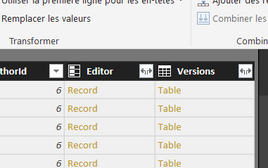
I have a sharepoint list with some columns with a multiple selection. Power Bi converts it by Tables.
Example with "Versions" (standard sharepoint column!):
When I click on I get this error:
If I use the link I obtain:
Any solution?
Thanks in advance,
Julien
Solved! Go to Solution.
Hi @jup,
>>I'm ok with that (it looks like a classical relationnal database) but is it compatible with powerapp? Powerapp can manage multiform/multilist implementation?
Actually, power bi not support M:M relationships, you need to add one bridge table to link them.
In my opinion, power bi will auto combine all column form sharepoint list. Since it is hard to deal with multiple type at same, I'm split them to different table with key column as link relationship.
After expand these columns, it will similar as normal relationship databsae.(I think it is more simply than use complex table to create visualizations)
Regards,
Xiaoxin Sheng
Hi @jup,
Current I haven't found a effective method to solve multiple type convert issue.
For my opinion, I will use one column as primary key and split current table to multiple tables with key column and other type columns. Then expand different type columns and try to convert them to table.
BTW, I don't think you can direct expand all table columns.
Regards,
Xiaoxin Sheng
Hi @Anonymous,
Thanks for you answer. I missed that my multi selection column is a lookup.
So if I understood correctly I have to add a third list between them? In this one I will use first table primary keys and second table informations.
I'm ok with that (it looks like a classical relationnal database) but is it compatible with powerapp? Powerapp can manage multiform/multilist implementation?
I think yes (basic software like access can do it) but I prefer asking 🙂
Have a nice day
Julien
Hi @jup,
>>I'm ok with that (it looks like a classical relationnal database) but is it compatible with powerapp? Powerapp can manage multiform/multilist implementation?
Actually, power bi not support M:M relationships, you need to add one bridge table to link them.
In my opinion, power bi will auto combine all column form sharepoint list. Since it is hard to deal with multiple type at same, I'm split them to different table with key column as link relationship.
After expand these columns, it will similar as normal relationship databsae.(I think it is more simply than use complex table to create visualizations)
Regards,
Xiaoxin Sheng
Thanks again, I will try !
Check out the May 2026 Power BI update to learn about new features.
Sign up to receive a private message when registration opens and key events begin.
If you have recently started exploring Fabric, we'd love to hear how it's going. Your feedback can help with product improvements.
| User | Count |
|---|---|
| 27 | |
| 25 | |
| 25 | |
| 21 | |
| 14 |
| User | Count |
|---|---|
| 52 | |
| 46 | |
| 23 | |
| 18 | |
| 18 |