Join us at FabCon Atlanta from March 16 - 20, 2026, for the ultimate Fabric, Power BI, AI and SQL community-led event. Save $200 with code FABCOMM.
Register now!Get Fabric Certified for FREE during Fabric Data Days. Don't miss your chance! Request now
I have this stange beheaviour. I use a background image and put some visuals on it. However when I click my background, by accident, al my visuals dissapear. I only get them back when I switch to anouther page and return again. Visual header is off.
As my background has three "blocks" I cannnot connect the visuals in order to prevend the user from clicking the background.
Any thoughts?
Solved! Go to Solution.
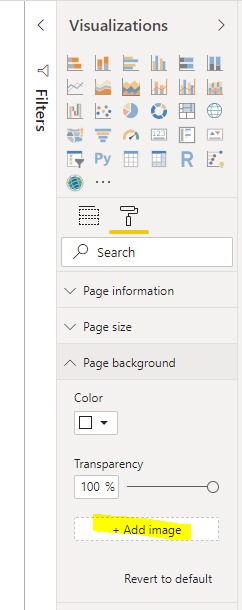
How did you insert this backgound image? Check if was like the image:
I apreciate if you give me a Kudo (like)
How did you insert this backgound image? Check if was like the image:
Great, thanks. I got this one from PowerBI.tips. It seems it was an image put on the background and NOT a background image.
Even the original did not work. So I used the "+ Add Image" and deleted the other one. Problem solved!
Check out the November 2025 Power BI update to learn about new features.
Advance your Data & AI career with 50 days of live learning, contests, hands-on challenges, study groups & certifications and more!