Get certified for free when you join Fabric Data Days 2026 and dive into Fabric, Power BI, SQL, AI, and other essential data skills.
Join nowJuly 7 - July 17 | Round 2 of the Power BI Dataviz World Championships. Don't miss your chance! Learn more
Hi all,
I have this measure in DAX which works absolutely fine. I want this to be in Power Query, please help:
Week Offset =
Var StartOfWeek = 'Calendar'[Date] - WEEKDAY( 'Calendar'[Date], 2)+1
Var StartOfCurrentWeek = TODAY() - WEEKDAY(TODAY(), 2)+1
Return (StartOfWeek - StartOfCurrentWeek)/7
Thanks much
Solved! Go to Solution.
Hi @mb0307
Add a Custom column with this code in Power Query:
(Date.StartOfWeek([Date])-Date.StartOfWeek(DateTime.Date(DateTime.LocalNow())))/7If this post helps, please consider accepting it as the solution to help the other members find it more quickly.
Appreciate your Kudos!!
I needed the week offset where a week starts on Saturday. Here's what I came up with - in case anyone else needs it (and - thanks to VahidDM for most of the work!)
I have looked for this week offset everywhere. I was having a hard time figuring how to set it up. Thank you. Your solution really helped.
Great solution. To set the right datatype in one line use this.
= Table.AddColumn(Previous_M_Query_Step, "Name_Column", each
(Number.From((Date.StartOfWeek([Datum])-Date.StartOfWeek([Huidige_Datum]))/7)),Int64.Type)
Hi @mb0307
Add a Custom column with this code in Power Query:
(Date.StartOfWeek([Date])-Date.StartOfWeek(DateTime.Date(DateTime.LocalNow())))/7If this post helps, please consider accepting it as the solution to help the other members find it more quickly.
Appreciate your Kudos!!
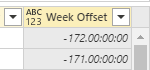
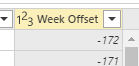
Excellent solution, do you know how to change the number to be a whole number all within the same formula? Just to take out the the time zeros from the number
nevermind, i figured out. Was simple. Just add a data type in the custom column section.
Worked perfectly. Thanks
Join us in Barcelona for FabCon and SQLCon, the Fabric, Power BI, SQL, and AI community event. Save €200 with code FABCMTY200.
Check out the July 2026 Power BI update to learn about new features.
Join Data Days 2026: 60 days of free live/on-demand sessions, challenges, study groups, and certification opportunities.
| User | Count |
|---|---|
| 30 | |
| 25 | |
| 25 | |
| 24 | |
| 16 |
| User | Count |
|---|---|
| 54 | |
| 34 | |
| 27 | |
| 23 | |
| 20 |