Get Fabric or SQL Certified for Free.
Get certified for free when you join Fabric Data Days 2026 and dive into Fabric, Power BI, SQL, AI, and other essential data skills.
Join now- Power BI forums
- Get Help with Power BI
- Desktop
- Service
- Report Server
- Power Query
- Mobile Apps
- Developer
- DAX Commands and Tips
- Custom Visuals Development Discussion
- Health and Life Sciences
- Power BI Spanish forums
- Translated Spanish Desktop
- Training and Consulting
- Instructor Led Training
- Dashboard in a Day for Women, by Women
- Galleries
- Data Stories Gallery
- Themes Gallery
- Contests Gallery
- QuickViz Gallery
- Quick Measures Gallery
- Visual Calculations Gallery
- Fabric Apps Gallery
- Notebook Gallery
- Translytical Task Flow Gallery
- TMDL Gallery
- R Script Showcase
- Webinars and Video Gallery
- Ideas
- Custom Visuals Ideas (read-only)
- Issues
- Issues
- Events
- Upcoming Events
July 7 - July 17 | Round 2 of the Power BI Dataviz World Championships. Don't miss your chance! Learn more
- Power BI forums
- Forums
- Get Help with Power BI
- Desktop
- Re: Week offset in Power Query
- Subscribe to RSS Feed
- Mark Topic as New
- Mark Topic as Read
- Float this Topic for Current User
- Bookmark
- Subscribe
- Printer Friendly Page


- Mark as New
- Bookmark
- Subscribe
- Mute
- Subscribe to RSS Feed
- Permalink
- Report Inappropriate Content
Week offset in Power Query
Hi all,
I have this measure in DAX which works absolutely fine. I want this to be in Power Query, please help:
Week Offset =
Var StartOfWeek = 'Calendar'[Date] - WEEKDAY( 'Calendar'[Date], 2)+1
Var StartOfCurrentWeek = TODAY() - WEEKDAY(TODAY(), 2)+1
Return (StartOfWeek - StartOfCurrentWeek)/7
Thanks much
Solved! Go to Solution.


- Mark as New
- Bookmark
- Subscribe
- Mute
- Subscribe to RSS Feed
- Permalink
- Report Inappropriate Content
Hi @mb0307
Add a Custom column with this code in Power Query:
(Date.StartOfWeek([Date])-Date.StartOfWeek(DateTime.Date(DateTime.LocalNow())))/7If this post helps, please consider accepting it as the solution to help the other members find it more quickly.
Appreciate your Kudos!!


- Mark as New
- Bookmark
- Subscribe
- Mute
- Subscribe to RSS Feed
- Permalink
- Report Inappropriate Content
I needed the week offset where a week starts on Saturday. Here's what I came up with - in case anyone else needs it (and - thanks to VahidDM for most of the work!)

- Mark as New
- Bookmark
- Subscribe
- Mute
- Subscribe to RSS Feed
- Permalink
- Report Inappropriate Content
I have looked for this week offset everywhere. I was having a hard time figuring how to set it up. Thank you. Your solution really helped.

- Mark as New
- Bookmark
- Subscribe
- Mute
- Subscribe to RSS Feed
- Permalink
- Report Inappropriate Content
Great solution. To set the right datatype in one line use this.
= Table.AddColumn(Previous_M_Query_Step, "Name_Column", each
(Number.From((Date.StartOfWeek([Datum])-Date.StartOfWeek([Huidige_Datum]))/7)),Int64.Type)- Mark as New
- Bookmark
- Subscribe
- Mute
- Subscribe to RSS Feed
- Permalink
- Report Inappropriate Content
Hi @mb0307
Add a Custom column with this code in Power Query:
(Date.StartOfWeek([Date])-Date.StartOfWeek(DateTime.Date(DateTime.LocalNow())))/7If this post helps, please consider accepting it as the solution to help the other members find it more quickly.
Appreciate your Kudos!!


- Mark as New
- Bookmark
- Subscribe
- Mute
- Subscribe to RSS Feed
- Permalink
- Report Inappropriate Content
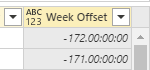
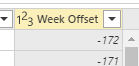
Excellent solution, do you know how to change the number to be a whole number all within the same formula? Just to take out the the time zeros from the number
- Mark as New
- Bookmark
- Subscribe
- Mute
- Subscribe to RSS Feed
- Permalink
- Report Inappropriate Content
nevermind, i figured out. Was simple. Just add a data type in the custom column section.
- Mark as New
- Bookmark
- Subscribe
- Mute
- Subscribe to RSS Feed
- Permalink
- Report Inappropriate Content
Worked perfectly. Thanks
Helpful resources

FabCon & SQLCon – Barcelona 2026
Join us in Barcelona for FabCon and SQLCon, the Fabric, Power BI, SQL, and AI community event. Save €200 with code FABCMTY200.

Power BI Monthly Update - July 2026
Check out the July 2026 Power BI update to learn about new features.

Data Days 2026
Join Data Days 2026: 60 days of free live/on-demand sessions, challenges, study groups, and certification opportunities.

Power BI DataViz World Championships - June 2026
A new Power BI DataViz World Championship is coming this June! Don't miss out on submitting your entry.

| User | Count |
|---|---|
| 30 | |
| 26 | |
| 25 | |
| 25 | |
| 16 |


| User | Count |
|---|---|
| 54 | |
| 32 | |
| 26 | |
| 23 | |
| 20 |


