Don't miss your chance to take exam DP-600 or DP-700 on us!
Request nowLearn from the best! Meet the four finalists headed to the FINALS of the Power BI Dataviz World Championships! Register now
Hi all,
I have this measure in DAX which works absolutely fine. I want this to be in Power Query, please help:
Week Offset =
Var StartOfWeek = 'Calendar'[Date] - WEEKDAY( 'Calendar'[Date], 2)+1
Var StartOfCurrentWeek = TODAY() - WEEKDAY(TODAY(), 2)+1
Return (StartOfWeek - StartOfCurrentWeek)/7
Thanks much
Solved! Go to Solution.
Hi @mb0307
Add a Custom column with this code in Power Query:
(Date.StartOfWeek([Date])-Date.StartOfWeek(DateTime.Date(DateTime.LocalNow())))/7If this post helps, please consider accepting it as the solution to help the other members find it more quickly.
Appreciate your Kudos!!
I needed the week offset where a week starts on Saturday. Here's what I came up with - in case anyone else needs it (and - thanks to VahidDM for most of the work!)
I have looked for this week offset everywhere. I was having a hard time figuring how to set it up. Thank you. Your solution really helped.
Great solution. To set the right datatype in one line use this.
= Table.AddColumn(Previous_M_Query_Step, "Name_Column", each
(Number.From((Date.StartOfWeek([Datum])-Date.StartOfWeek([Huidige_Datum]))/7)),Int64.Type)
Hi @mb0307
Add a Custom column with this code in Power Query:
(Date.StartOfWeek([Date])-Date.StartOfWeek(DateTime.Date(DateTime.LocalNow())))/7If this post helps, please consider accepting it as the solution to help the other members find it more quickly.
Appreciate your Kudos!!
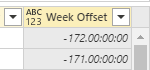
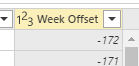
Excellent solution, do you know how to change the number to be a whole number all within the same formula? Just to take out the the time zeros from the number
nevermind, i figured out. Was simple. Just add a data type in the custom column section.
Worked perfectly. Thanks
| User | Count |
|---|---|
| 50 | |
| 40 | |
| 32 | |
| 14 | |
| 13 |
| User | Count |
|---|---|
| 83 | |
| 71 | |
| 37 | |
| 27 | |
| 24 |