Share feedback directly with Fabric product managers, participate in targeted research studies and influence the Fabric roadmap.
Sign up nowGet Fabric certified for FREE! Don't miss your chance! Learn more
Hi,
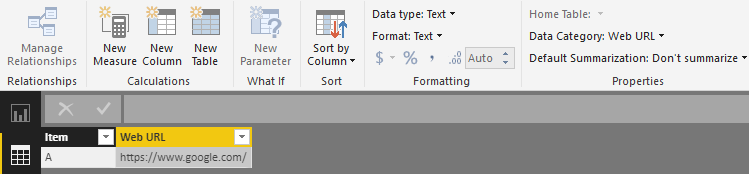
I changed the data category for one of my columns, which contain URLs, to 'Web URL'. But when I create a table with these URLs, they don't appear as hyperlinks as they should.
The URLs appear in the data without "www." at the beginning. Could this be a reason why it doesn't work?
Thanks,
afk
Solved! Go to Solution.
Hi @afk,
I am afraid that you must add the "https" or "www" with your URL, than the web URL can work.
Regards,
Daniel He
Hi @afk,
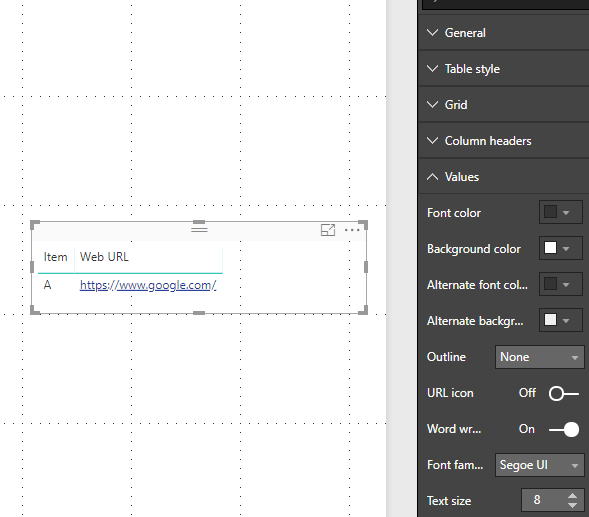
Based on my test, it could work on my side like the picture below:
Could you please check the version of your Power BI Desktop(2.59.5135.781 64-bit (June 2018))? If issue persists, would you please share your pbix file if possible? Also you can test with our sample report on your side to see if the same issue occurs.
Regards,
Daniel He
Thanks for your response Daniel!
Actually, the web addresses in my dataset don't start with either "https" or "www."
Does it work for you if the URL is just "google.com"?
afk
Hi @afk,
I am afraid that you must add the "https" or "www" with your URL, than the web URL can work.
Regards,
Daniel He
If you love stickers, then you will definitely want to check out our Community Sticker Challenge!
Check out the January 2026 Power BI update to learn about new features.
| User | Count |
|---|---|
| 61 | |
| 58 | |
| 45 | |
| 21 | |
| 18 |
| User | Count |
|---|---|
| 119 | |
| 116 | |
| 37 | |
| 34 | |
| 30 |