Get certified for free when you join Fabric Data Days 2026 and dive into Fabric, Power BI, SQL, AI, and other essential data skills.
Join nowJuly 7 - July 17 | Round 2 of the Power BI Dataviz World Championships. Don't miss your chance! Learn more
Hi,
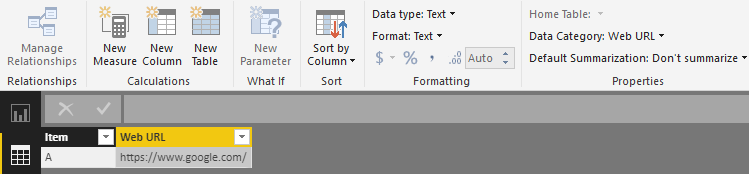
I changed the data category for one of my columns, which contain URLs, to 'Web URL'. But when I create a table with these URLs, they don't appear as hyperlinks as they should.
The URLs appear in the data without "www." at the beginning. Could this be a reason why it doesn't work?
Thanks,
afk
Solved! Go to Solution.
Hi @afk,
I am afraid that you must add the "https" or "www" with your URL, than the web URL can work.
Regards,
Daniel He
Hi @afk,
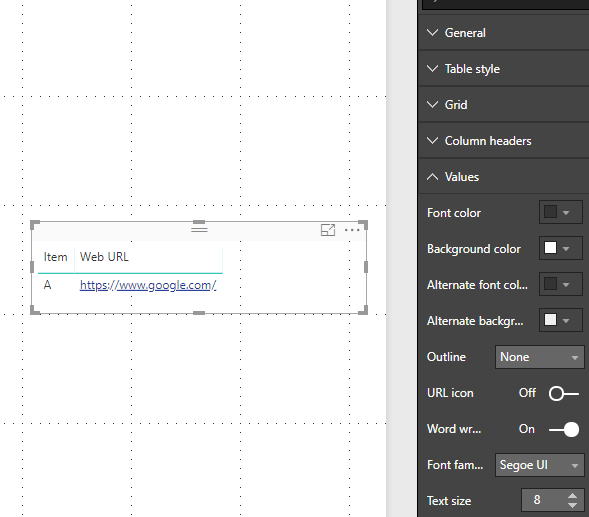
Based on my test, it could work on my side like the picture below:
Could you please check the version of your Power BI Desktop(2.59.5135.781 64-bit (June 2018))? If issue persists, would you please share your pbix file if possible? Also you can test with our sample report on your side to see if the same issue occurs.
Regards,
Daniel He
Thanks for your response Daniel!
Actually, the web addresses in my dataset don't start with either "https" or "www."
Does it work for you if the URL is just "google.com"?
afk
Hi @afk,
I am afraid that you must add the "https" or "www" with your URL, than the web URL can work.
Regards,
Daniel He
Join us in Barcelona for FabCon and SQLCon, the Fabric, Power BI, SQL, and AI community event. Save €200 with code FABCMTY200.
Join Data Days 2026: 60 days of free live/on-demand sessions, challenges, study groups, and certification opportunities.
| User | Count |
|---|---|
| 29 | |
| 28 | |
| 26 | |
| 25 | |
| 18 |
| User | Count |
|---|---|
| 54 | |
| 46 | |
| 38 | |
| 28 | |
| 21 |