Join us at FabCon Atlanta from March 16 - 20, 2026, for the ultimate Fabric, Power BI, AI and SQL community-led event. Save $200 with code FABCOMM.
Register now!The Power BI Data Visualization World Championships is back! It's time to submit your entry. Live now!
Hi all,
New to PowerBI - trying to recreate some charts I am use to in excel.
Its a property business - which has a list of tenants - with rent adding up to a total rent roll - across different sites
I want to bridge total rent roll at the end of one period (2017 in this example) to the next - end of 2018
The bridge segments - i would like to come from the 2nd table - split between new tenants starting, tenants leaving and tenants renewing
The first table:
| Property code | Date | Closing rent roll |
| 101 | 31/12/2017 | 1,000 |
| 101 | 31/12/2018 | 1,200 |
| 102 | 31/12/2017 | 2,000 |
| 102 | 31/12/2018 | 2,500 |
The 2nd table:
| Property code | Date | Net RR | Status |
| 101 | 31/03/2018 | 500 | New starters |
| 101 | 31/03/2018 | -500 | Leavers |
| 101 | 31/03/2018 | 200 | Renewals |
| 102 | 31/03/2018 | 500 | New starters |
| 102 | 31/03/2018 | -500 | Leavers |
| 102 | 31/03/2018 | 500 | Renewals |
As you can see the sum of the movements - equals the total movement in rent roll
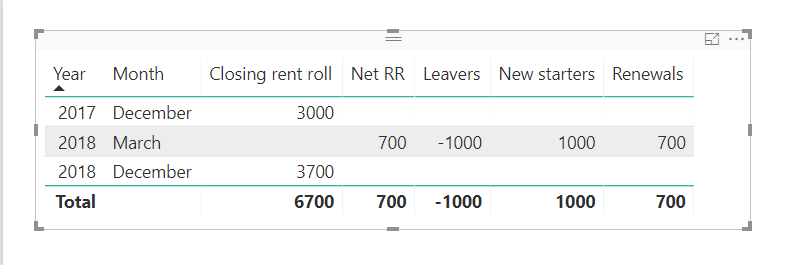
IN power BI - i have got as far as producing the table below
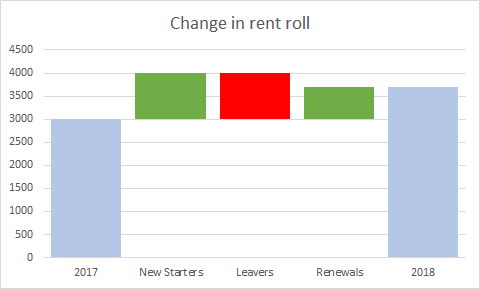
And I would like the graph to look like - something like the below
so its 3000 + 1000 new rev.- 1000 rev. + 700 incremental rev. from existing = 3700 rent roll
Any help would be greatly apprecaited
thanks,
Laurence
You may try using UNION Function to add a calculated table first.
The Power BI Data Visualization World Championships is back! It's time to submit your entry.
Check out the January 2026 Power BI update to learn about new features.
| User | Count |
|---|---|
| 61 | |
| 47 | |
| 39 | |
| 24 | |
| 23 |
| User | Count |
|---|---|
| 144 | |
| 106 | |
| 63 | |
| 38 | |
| 31 |