Get certified for free when you join Fabric Data Days 2026 and dive into Fabric, Power BI, SQL, AI, and other essential data skills.
Join nowJuly 7 - July 17 | Round 2 of the Power BI Dataviz World Championships. Don't miss your chance! Learn more
Hi,
I would like to display a table that has the similar patterns to waterfall chart. (essentially works in the same way)
Does anyone know if there is such a visualization? I tried the tables but it seems like the only possible way is to do measures if I want it to display values like a waterfall chart.
So essentially the total is a measure a have and usually in a waterfall chart, they will automatically breakdown into the dates such as in this way. But is there a table that can do this?
| Jan | Feb | Mar | Total | |
| Apple | 1 | 2 | 3 | 6 |
| Grape | 2 | 4 | 2 | 8 |
| Orange | 5 | 0 | 0 | 5 |
Hi, @kitala11
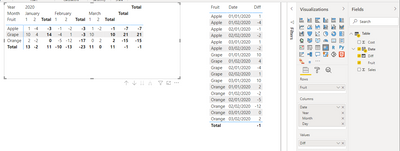
Based on your description, i created data to reproduce your scenario. The pbix file is attached in the end.
Table:
You may create a matrix visual as below.
Best Regards
Allan
If this post helps, then please consider Accept it as the solution to help the other members find it more quickly.
@kitala11 , Are you looking for Hybrid table. Month on columns and total as onr more value at end ?
if you are looking for a Hybrid display with Matrix Column and measure
https://community.powerbi.com/t5/Community-Blog/Creating-a-custom-or-hybrid-matrix-in-PowerBI/ba-p/1...
https://community.powerbi.com/t5/Quick-Measures-Gallery/The-New-Hotness-Custom-Matrix-Hierarchy/m-p/...
vote for Hybrid Table
https://ideas.powerbi.com/ideas/idea/?ideaid=9bc32b23-1eb1-4e74-8b34-349887b37ebc
Join us in Barcelona for FabCon and SQLCon, the Fabric, Power BI, SQL, and AI community event. Save €200 with code FABCMTY200.
Join Fabric Data Days 2026: 60 days of free live/on-demand sessions, challenges, study groups, and certification opportunities.
| User | Count |
|---|---|
| 22 | |
| 22 | |
| 18 | |
| 16 | |
| 13 |
| User | Count |
|---|---|
| 63 | |
| 41 | |
| 40 | |
| 39 | |
| 38 |