Join us at FabCon Atlanta from March 16 - 20, 2026, for the ultimate Fabric, Power BI, AI and SQL community-led event. Save $200 with code FABCOMM.
Register now!Learn from the best! Meet the four finalists headed to the FINALS of the Power BI Dataviz World Championships! Register now
Hi,
I would like to display a table that has the similar patterns to waterfall chart. (essentially works in the same way)
Does anyone know if there is such a visualization? I tried the tables but it seems like the only possible way is to do measures if I want it to display values like a waterfall chart.
So essentially the total is a measure a have and usually in a waterfall chart, they will automatically breakdown into the dates such as in this way. But is there a table that can do this?
| Jan | Feb | Mar | Total | |
| Apple | 1 | 2 | 3 | 6 |
| Grape | 2 | 4 | 2 | 8 |
| Orange | 5 | 0 | 0 | 5 |
Hi, @kitala11
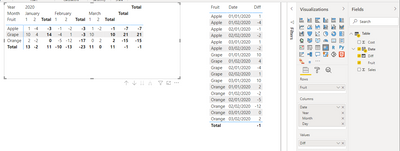
Based on your description, i created data to reproduce your scenario. The pbix file is attached in the end.
Table:
You may create a matrix visual as below.
Best Regards
Allan
If this post helps, then please consider Accept it as the solution to help the other members find it more quickly.
@kitala11 , Are you looking for Hybrid table. Month on columns and total as onr more value at end ?
if you are looking for a Hybrid display with Matrix Column and measure
https://community.powerbi.com/t5/Community-Blog/Creating-a-custom-or-hybrid-matrix-in-PowerBI/ba-p/1...
https://community.powerbi.com/t5/Quick-Measures-Gallery/The-New-Hotness-Custom-Matrix-Hierarchy/m-p/...
vote for Hybrid Table
https://ideas.powerbi.com/ideas/idea/?ideaid=9bc32b23-1eb1-4e74-8b34-349887b37ebc
Share feedback directly with Fabric product managers, participate in targeted research studies and influence the Fabric roadmap.
Check out the February 2026 Power BI update to learn about new features.
| User | Count |
|---|---|
| 61 | |
| 59 | |
| 42 | |
| 18 | |
| 15 |
| User | Count |
|---|---|
| 109 | |
| 101 | |
| 39 | |
| 29 | |
| 29 |