FabCon is coming to Atlanta
Join us at FabCon Atlanta from March 16 - 20, 2026, for the ultimate Fabric, Power BI, AI and SQL community-led event. Save $200 with code FABCOMM.
Register now!- Power BI forums
- Get Help with Power BI
- Desktop
- Service
- Report Server
- Power Query
- Mobile Apps
- Developer
- DAX Commands and Tips
- Custom Visuals Development Discussion
- Health and Life Sciences
- Power BI Spanish forums
- Translated Spanish Desktop
- Training and Consulting
- Instructor Led Training
- Dashboard in a Day for Women, by Women
- Galleries
- Data Stories Gallery
- Themes Gallery
- Contests Gallery
- QuickViz Gallery
- Quick Measures Gallery
- Visual Calculations Gallery
- Notebook Gallery
- Translytical Task Flow Gallery
- TMDL Gallery
- R Script Showcase
- Webinars and Video Gallery
- Ideas
- Custom Visuals Ideas (read-only)
- Issues
- Issues
- Events
- Upcoming Events
The Power BI Data Visualization World Championships is back! Get ahead of the game and start preparing now! Learn more
- Power BI forums
- Forums
- Get Help with Power BI
- Desktop
- Re: Vlookup on 3 columns
- Subscribe to RSS Feed
- Mark Topic as New
- Mark Topic as Read
- Float this Topic for Current User
- Bookmark
- Subscribe
- Printer Friendly Page

- Mark as New
- Bookmark
- Subscribe
- Mute
- Subscribe to RSS Feed
- Permalink
- Report Inappropriate Content
Vlookup on 3 columns
Hi,
If a part no. have Lenth, width height (not blank or zero any of the 3 columns) then YES else NO. I need your help.
| Part no | Lenth | width | Height | Result |
| 1233 | 3 | 0 | 5 | NO |
| 1234 | 8 | 6 | NO | |
| 1235 | 2 | 3 | 4 | YES |
| 1236 | 2 | NO | ||
| 1237 | 1 | 2 | 3 | YES |
Solved! Go to Solution.
- Mark as New
- Bookmark
- Subscribe
- Mute
- Subscribe to RSS Feed
- Permalink
- Report Inappropriate Content
Hello @sbhan4
Your question is unclear, do you have two tables or do you want the calculation in a single table.
My answer was for a table and I misplaced OR instead of y.
Medida: IF(SELECTEDVALUE(table[Length])>0 && SELECTEDVALUE(table[width])>0 && SELECTEDVALUE(table[Height])>0, "YES","NO")
O
Measurement: IF(ISBLANK(SELECTEDVALUE(table[Length]) ISBLANK(SELECTEDVALUE(table[width]) ISBLANK(SELECTEDVALUE(table[Height]) SELECTEDVALUE(table[Length]) ? 0 ? SELECTEDVALUE(table[width]) to 0 ? SELECTEDVALUE(table[Height]) to 0, "NO","YES")


- Mark as New
- Bookmark
- Subscribe
- Mute
- Subscribe to RSS Feed
- Permalink
- Report Inappropriate Content
@Anonymous
You're looking for an IF statement and not a vlookup..?
If so, create a new column
- Mark as New
- Bookmark
- Subscribe
- Mute
- Subscribe to RSS Feed
- Permalink
- Report Inappropriate Content
@darentengmfs Vlookup or ef else anything is fine. The REsult should come to like that
- Mark as New
- Bookmark
- Subscribe
- Mute
- Subscribe to RSS Feed
- Permalink
- Report Inappropriate Content
@Anonymous
Please try my formula in the reply above.
- Mark as New
- Bookmark
- Subscribe
- Mute
- Subscribe to RSS Feed
- Permalink
- Report Inappropriate Content
Hi @Anonymous
Please make sure your three number columns are of number type.
Measure = IF(SELECTEDVALUE(table[Length]>0 || SELECTEDVALUE(table[width]>0 || SELECTEDVALUE(table[Height]>0, "YES","NO")
OR
Measure = IF(ISBLANK(SELECTEDVALUE(table[Length]) || ISBLANK(SELECTEDVALUE(table[width]) || ISBLANK(SELECTEDVALUE(table[Height]) || SELECTEDVALUE(table[Length] = 0 || SELECTEDVALUE(table[width] = 0 || SELECTEDVALUE(table[Height] = 0, "NO","YES")
- Mark as New
- Bookmark
- Subscribe
- Mute
- Subscribe to RSS Feed
- Permalink
- Report Inappropriate Content
@Anonymous Hi Pranit,
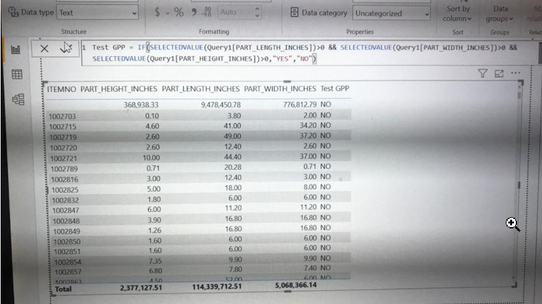
Well formula should give me YES but giving me "NO". Any suggestions.
- Mark as New
- Bookmark
- Subscribe
- Mute
- Subscribe to RSS Feed
- Permalink
- Report Inappropriate Content
@Anonymous Thanks. Didn't work for me. Can you provide me pbix file for it?
- Mark as New
- Bookmark
- Subscribe
- Mute
- Subscribe to RSS Feed
- Permalink
- Report Inappropriate Content
Hello @sbhan4
Your question is unclear, do you have two tables or do you want the calculation in a single table.
My answer was for a table and I misplaced OR instead of y.
Medida: IF(SELECTEDVALUE(table[Length])>0 && SELECTEDVALUE(table[width])>0 && SELECTEDVALUE(table[Height])>0, "YES","NO")
O
Measurement: IF(ISBLANK(SELECTEDVALUE(table[Length]) ISBLANK(SELECTEDVALUE(table[width]) ISBLANK(SELECTEDVALUE(table[Height]) SELECTEDVALUE(table[Length]) ? 0 ? SELECTEDVALUE(table[width]) to 0 ? SELECTEDVALUE(table[Height]) to 0, "NO","YES")
- Mark as New
- Bookmark
- Subscribe
- Mute
- Subscribe to RSS Feed
- Permalink
- Report Inappropriate Content


- Mark as New
- Bookmark
- Subscribe
- Mute
- Subscribe to RSS Feed
- Permalink
- Report Inappropriate Content
@Anonymous
Formula given by @Anonymous works perfectly,
@Anonymous you have missed closing Parthese after each Selected value that is creating problem to him
Just Rewrite the Fucntion and Share
Did I answer your question? Mark my post as a solution! Appreciate your Kudos!!
MY Blog || My YouTube Channel || Connect with me on Linkedin || My Latest Data Story - Ageing Analysis
Proud to be a Super User!
- Mark as New
- Bookmark
- Subscribe
- Mute
- Subscribe to RSS Feed
- Permalink
- Report Inappropriate Content
@VijayP Thank you, Vijay! I have provided brackets as well but didn't work for me. Can you please try this out in pbix file.
- Mark as New
- Bookmark
- Subscribe
- Mute
- Subscribe to RSS Feed
- Permalink
- Report Inappropriate Content
@Anonymous
PFA
https://drive.google.com/file/d/1aJ9AjE90eDNT8ufKLHo79YBZ90EuteXj/view?usp=sharing
@Anonymous Did Small Change SELECTEDVALUE not requried
@Anonymous if you find this as solution please mention this as solution and share your Kudoes
Did I answer your question? Mark my post as a solution! Appreciate your Kudos!!
MY Blog || My YouTube Channel || Connect with me on Linkedin || My Latest Data Story - Ageing Analysis
Proud to be a Super User!
- Mark as New
- Bookmark
- Subscribe
- Mute
- Subscribe to RSS Feed
- Permalink
- Report Inappropriate Content
Helpful resources

Power BI Dataviz World Championships
The Power BI Data Visualization World Championships is back! Get ahead of the game and start preparing now!

Power BI Monthly Update - November 2025
Check out the November 2025 Power BI update to learn about new features.

FabCon Atlanta 2026
Join us at FabCon Atlanta, March 16-20, for the ultimate Fabric, Power BI, AI and SQL community-led event. Save $200 with code FABCOMM.

| User | Count |
|---|---|
| 59 | |
| 46 | |
| 42 | |
| 23 | |
| 18 |


| User | Count |
|---|---|
| 192 | |
| 125 | |
| 99 | |
| 67 | |
| 48 |


