Join us at FabCon Atlanta from March 16 - 20, 2026, for the ultimate Fabric, Power BI, AI and SQL community-led event. Save $200 with code FABCOMM.
Register now!The Power BI Data Visualization World Championships is back! It's time to submit your entry. Live now!
Hello.
I'd like to visualize changes in a state (as in status). I have items that can move between states. To Do > In progress > Done for example. and i'd like to visualize this flow.
The data looks something like this:
| ID | Date | State | State changed | State Flow |
| 1 | 4/17/2019 12:00:00 AM | To do | FALSE | To do to To do |
| 1 | 4/18/2019 12:00:00 AM | To do | FALSE | To do to To do |
| 1 | 4/19/2019 12:00:00 AM | To do | FALSE | To do to To do |
| 1 | 4/20/2019 12:00:00 AM | In progress | TRUE | To do to In progress |
| 1 | 4/21/2019 12:00:00 AM | In progress | FALSE | In progress to In progress |
| 1 | 4/22/2019 12:00:00 AM | done | TRUE | In progress to done |
| 1 | 4/23/2019 12:00:00 AM | done | FALSE | done to done |
| 1 | 4/24/2019 12:00:00 AM | done | FALSE | done to done |
| 1 | 4/25/2019 12:00:00 AM | done | FALSE | done to done |
Note that State flow i a calculated column and the "to" can be changed. it can also be split to 2 columns if needed.
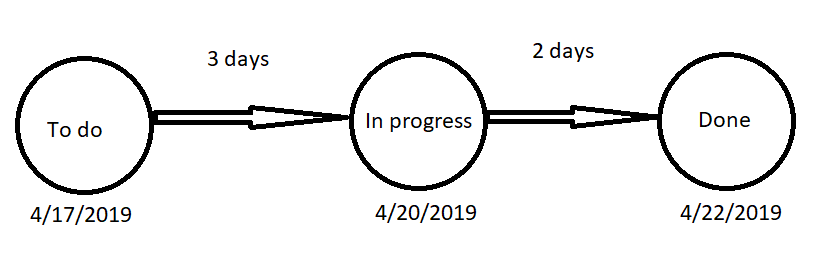
My desired result would look something like this:
Paint skills ^^
If somebody knows a visual wich is capeable of something like this i'd like to know. Any other ideas to visualize this info is also welcome. Thanks in advance.
Solved! Go to Solution.
Hi @Anonymous ,
I check custom visual but haven't found any custom visual suitable for your requirement. Maybe you can try to use python visual or r visual to manually draw these graph.
Regards,
Xiaoxin Sheng
Hi @Anonymous ,
You can use following calculate column formula to achieve your requirement:
Status =
VAR _fDate =
CALCULATE (
MIN ( Table2[Date] ),
FILTER ( ALL ( Table2 ), [ID] = EARLIER ( Table2[ID] ) )
)
VAR _diff =
DATEDIFF ( _fDate, Table2[Date], DAY )
RETURN
IF ( _diff < 3, "To do", IF ( _diff >= 3 && _diff < 5, "In progress", "Done" ) )
Status Changed =
VAR _preview =
CALCULATE (
MAX ( Table2[Date] ),
FILTER (
ALL ( Table2 ),
[ID] = EARLIER ( Table2[ID] )
&& [Date] < EARLIER ( Table2[Date] )
)
)
RETURN
IF (
_preview <> BLANK (),
[Status]
<> LOOKUPVALUE ( Table2[Status], Table2[ID], [ID], Table2[Date], _preview )
)
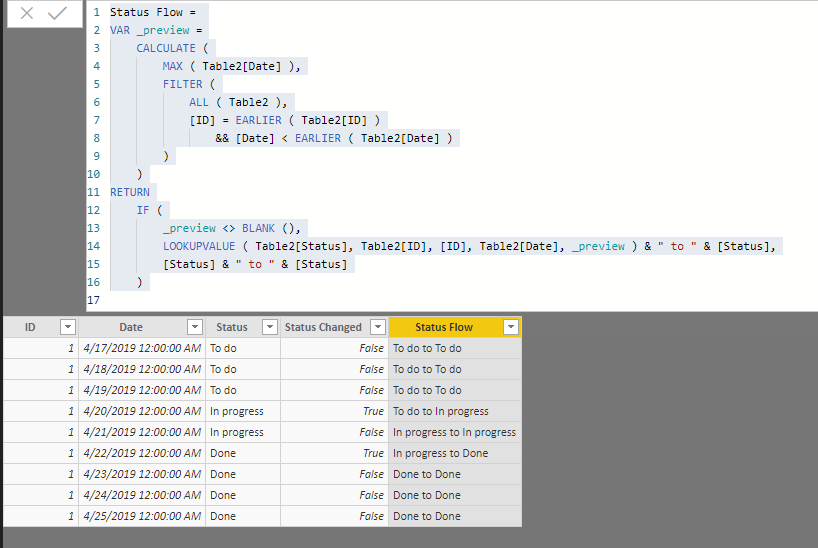
Status Flow =
VAR _preview =
CALCULATE (
MAX ( Table2[Date] ),
FILTER (
ALL ( Table2 ),
[ID] = EARLIER ( Table2[ID] )
&& [Date] < EARLIER ( Table2[Date] )
)
)
RETURN
IF (
_preview <> BLANK (),
LOOKUPVALUE ( Table2[Status], Table2[ID], [ID], Table2[Date], _preview ) & " to " & [Status],
[Status] & " to " & [Status]
)
Regards,
Xiaoxin Sheng
I Already have the data as shown. I would like to create a viz something like i showed
Hi @Anonymous ,
I check custom visual but haven't found any custom visual suitable for your requirement. Maybe you can try to use python visual or r visual to manually draw these graph.
Regards,
Xiaoxin Sheng
The Power BI Data Visualization World Championships is back! It's time to submit your entry.
| User | Count |
|---|---|
| 47 | |
| 45 | |
| 33 | |
| 33 | |
| 30 |
| User | Count |
|---|---|
| 136 | |
| 116 | |
| 58 | |
| 58 | |
| 56 |