Don't miss your chance to take the Fabric Data Engineer (DP-600) exam for FREE! Find out how by attending the DP-600 session on April 23rd (pacific time), live or on-demand.
Learn moreJoin the FabCon + SQLCon recap series. Up next: Power BI, Real-Time Intelligence, IQ and AI, and Data Factory take center stage. All sessions are available on-demand after the live show. Register now
Hello.
I'd like to visualize changes in a state (as in status). I have items that can move between states. To Do > In progress > Done for example. and i'd like to visualize this flow.
The data looks something like this:
| ID | Date | State | State changed | State Flow |
| 1 | 4/17/2019 12:00:00 AM | To do | FALSE | To do to To do |
| 1 | 4/18/2019 12:00:00 AM | To do | FALSE | To do to To do |
| 1 | 4/19/2019 12:00:00 AM | To do | FALSE | To do to To do |
| 1 | 4/20/2019 12:00:00 AM | In progress | TRUE | To do to In progress |
| 1 | 4/21/2019 12:00:00 AM | In progress | FALSE | In progress to In progress |
| 1 | 4/22/2019 12:00:00 AM | done | TRUE | In progress to done |
| 1 | 4/23/2019 12:00:00 AM | done | FALSE | done to done |
| 1 | 4/24/2019 12:00:00 AM | done | FALSE | done to done |
| 1 | 4/25/2019 12:00:00 AM | done | FALSE | done to done |
Note that State flow i a calculated column and the "to" can be changed. it can also be split to 2 columns if needed.
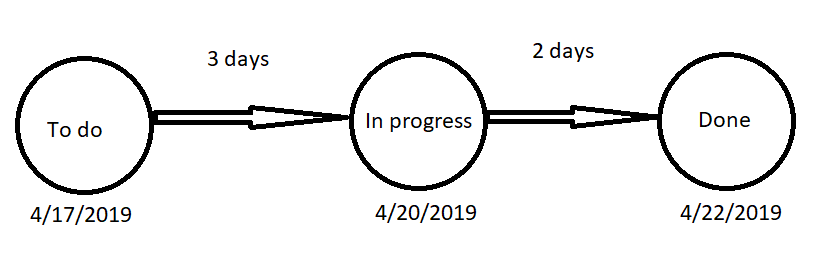
My desired result would look something like this:
Paint skills ^^
If somebody knows a visual wich is capeable of something like this i'd like to know. Any other ideas to visualize this info is also welcome. Thanks in advance.
Solved! Go to Solution.
Hi @Anonymous ,
I check custom visual but haven't found any custom visual suitable for your requirement. Maybe you can try to use python visual or r visual to manually draw these graph.
Regards,
Xiaoxin Sheng
Hi @Anonymous ,
You can use following calculate column formula to achieve your requirement:
Status =
VAR _fDate =
CALCULATE (
MIN ( Table2[Date] ),
FILTER ( ALL ( Table2 ), [ID] = EARLIER ( Table2[ID] ) )
)
VAR _diff =
DATEDIFF ( _fDate, Table2[Date], DAY )
RETURN
IF ( _diff < 3, "To do", IF ( _diff >= 3 && _diff < 5, "In progress", "Done" ) )
Status Changed =
VAR _preview =
CALCULATE (
MAX ( Table2[Date] ),
FILTER (
ALL ( Table2 ),
[ID] = EARLIER ( Table2[ID] )
&& [Date] < EARLIER ( Table2[Date] )
)
)
RETURN
IF (
_preview <> BLANK (),
[Status]
<> LOOKUPVALUE ( Table2[Status], Table2[ID], [ID], Table2[Date], _preview )
)
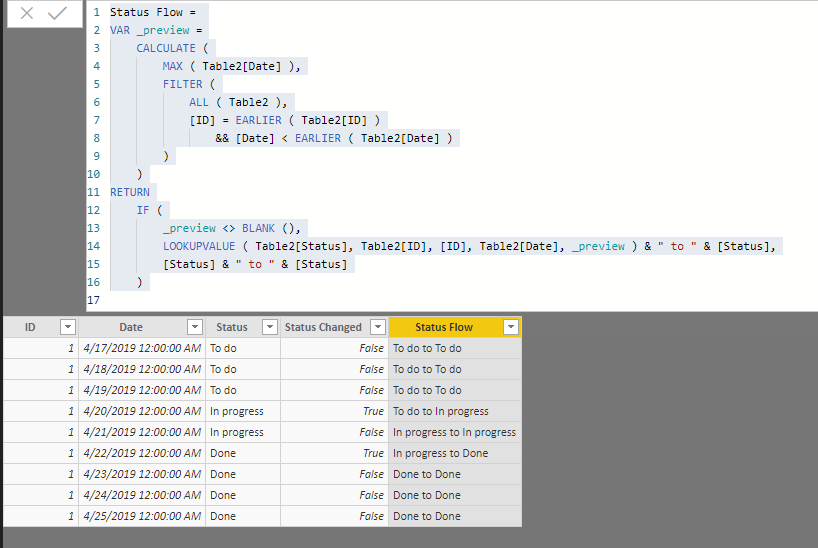
Status Flow =
VAR _preview =
CALCULATE (
MAX ( Table2[Date] ),
FILTER (
ALL ( Table2 ),
[ID] = EARLIER ( Table2[ID] )
&& [Date] < EARLIER ( Table2[Date] )
)
)
RETURN
IF (
_preview <> BLANK (),
LOOKUPVALUE ( Table2[Status], Table2[ID], [ID], Table2[Date], _preview ) & " to " & [Status],
[Status] & " to " & [Status]
)
Regards,
Xiaoxin Sheng
I Already have the data as shown. I would like to create a viz something like i showed
Hi @Anonymous ,
I check custom visual but haven't found any custom visual suitable for your requirement. Maybe you can try to use python visual or r visual to manually draw these graph.
Regards,
Xiaoxin Sheng
Check out the April 2026 Power BI update to learn about new features.
If you have recently started exploring Fabric, we'd love to hear how it's going. Your feedback can help with product improvements.
A new Power BI DataViz World Championship is coming this June! Don't miss out on submitting your entry.
| User | Count |
|---|---|
| 48 | |
| 40 | |
| 37 | |
| 20 | |
| 16 |
| User | Count |
|---|---|
| 69 | |
| 67 | |
| 32 | |
| 27 | |
| 26 |