Join us at FabCon Atlanta from March 16 - 20, 2026, for the ultimate Fabric, Power BI, AI and SQL community-led event. Save $200 with code FABCOMM.
Register now!The Power BI Data Visualization World Championships is back! It's time to submit your entry. Live now!
I have two queries
A
| ts | m_id | value |
| 2019-10-17 12:00:00 | P1 | 12 |
| 2019-10-17 12:10:00 | P1 | 11 |
| 2019-10-17 12:05:00 | P2 | 20 |
B
| ts_start | ts_end | type | m_id |
| 2019-10-17 11:30:00 | 2019-10-17 12:30:00 | Direct | P1 |
| 2019-10-17 12:30:00 | 2019-10-17 13:30:00 | Indirect | P1 |
Table A & B m_id is a "many to many" relationship. I use it for filtering (single selection).
I want to visualize table A value by timestamp as a line chart. I want the charts background color to vary depending on table B type for that timestamp range. How do I accomplish this?
I don't know of a way of doing it using matplotlib.
I don't know any R.
I am new to Power Bi.
Is there a better way of visualizing this data?
Solved! Go to Solution.
Hi @johnerlandsson ,
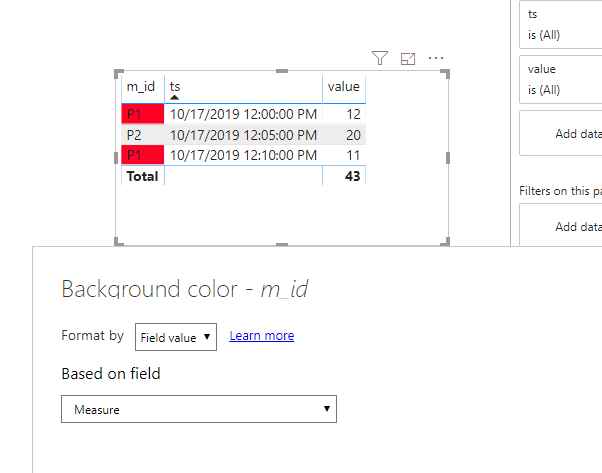
Currently, we cannot set conditional formmating of the background in line chart. We can create a measure and use table visual to work around.
Measure =
VAR ts =
MAX ( A[ts] )
VAR mid =
MAX ( A[m_id] )
VAR typ =
CALCULATE (
MAX ( B[type] ),
FILTER ( B, B[ts_start] <= ts && B[ts_end] >= ts && B[m_id] = mid )
)
RETURN
IF ( typ = "Direct", "#FF0027", IF ( typ = "Indirect", "#0040FF", BLANK () ) )
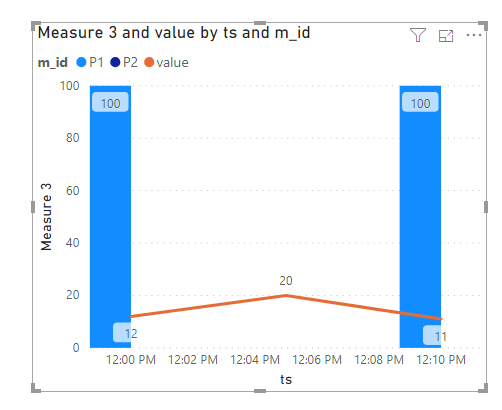
Btw, we can use Line and clustered column chart to work around by a new measure.
Measure 3 =
VAR ts =
MAX ( A[ts] )
VAR mid =
MAX ( A[m_id] )
VAR typ =
CALCULATE (
MAX ( B[type] ),
FILTER ( B, B[ts_start] <= ts && B[ts_end] >= ts && B[m_id] = mid )
)
RETURN
IF ( typ = "Direct", 100, IF ( typ = "Indirect",200, BLANK () ) )
Hi @johnerlandsson ,
Currently, we cannot set conditional formmating of the background in line chart. We can create a measure and use table visual to work around.
Measure =
VAR ts =
MAX ( A[ts] )
VAR mid =
MAX ( A[m_id] )
VAR typ =
CALCULATE (
MAX ( B[type] ),
FILTER ( B, B[ts_start] <= ts && B[ts_end] >= ts && B[m_id] = mid )
)
RETURN
IF ( typ = "Direct", "#FF0027", IF ( typ = "Indirect", "#0040FF", BLANK () ) )
Btw, we can use Line and clustered column chart to work around by a new measure.
Measure 3 =
VAR ts =
MAX ( A[ts] )
VAR mid =
MAX ( A[m_id] )
VAR typ =
CALCULATE (
MAX ( B[type] ),
FILTER ( B, B[ts_start] <= ts && B[ts_end] >= ts && B[m_id] = mid )
)
RETURN
IF ( typ = "Direct", 100, IF ( typ = "Indirect",200, BLANK () ) )
| User | Count |
|---|---|
| 50 | |
| 37 | |
| 31 | |
| 22 | |
| 19 |
| User | Count |
|---|---|
| 135 | |
| 102 | |
| 60 | |
| 36 | |
| 35 |