Don't miss your chance to take the Fabric Data Engineer (DP-700) exam on us!
Learn moreWe've captured the moments from FabCon & SQLCon that everyone is talking about, and we are bringing them to the community, live and on-demand. Starts on April 14th. Register now
I have two queries
A
| ts | m_id | value |
| 2019-10-17 12:00:00 | P1 | 12 |
| 2019-10-17 12:10:00 | P1 | 11 |
| 2019-10-17 12:05:00 | P2 | 20 |
B
| ts_start | ts_end | type | m_id |
| 2019-10-17 11:30:00 | 2019-10-17 12:30:00 | Direct | P1 |
| 2019-10-17 12:30:00 | 2019-10-17 13:30:00 | Indirect | P1 |
Table A & B m_id is a "many to many" relationship. I use it for filtering (single selection).
I want to visualize table A value by timestamp as a line chart. I want the charts background color to vary depending on table B type for that timestamp range. How do I accomplish this?
I don't know of a way of doing it using matplotlib.
I don't know any R.
I am new to Power Bi.
Is there a better way of visualizing this data?
Solved! Go to Solution.
Hi @johnerlandsson ,
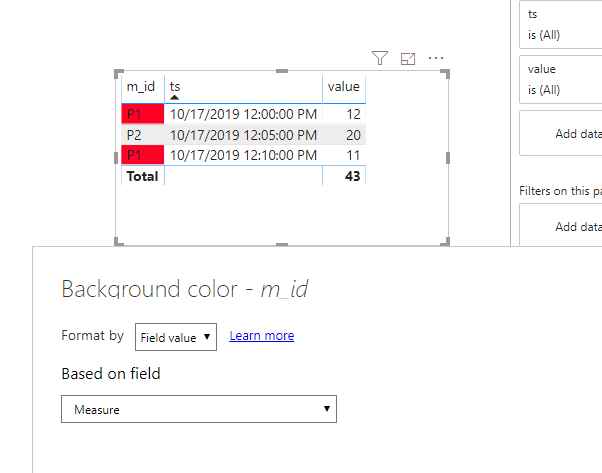
Currently, we cannot set conditional formmating of the background in line chart. We can create a measure and use table visual to work around.
Measure =
VAR ts =
MAX ( A[ts] )
VAR mid =
MAX ( A[m_id] )
VAR typ =
CALCULATE (
MAX ( B[type] ),
FILTER ( B, B[ts_start] <= ts && B[ts_end] >= ts && B[m_id] = mid )
)
RETURN
IF ( typ = "Direct", "#FF0027", IF ( typ = "Indirect", "#0040FF", BLANK () ) )
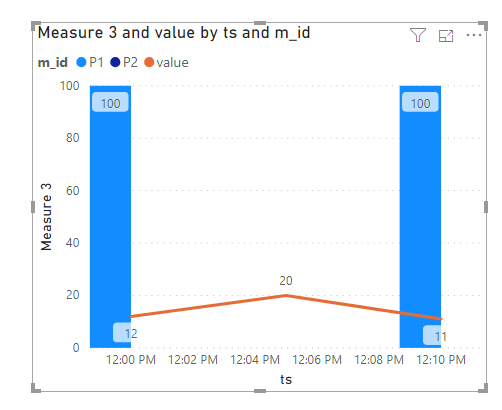
Btw, we can use Line and clustered column chart to work around by a new measure.
Measure 3 =
VAR ts =
MAX ( A[ts] )
VAR mid =
MAX ( A[m_id] )
VAR typ =
CALCULATE (
MAX ( B[type] ),
FILTER ( B, B[ts_start] <= ts && B[ts_end] >= ts && B[m_id] = mid )
)
RETURN
IF ( typ = "Direct", 100, IF ( typ = "Indirect",200, BLANK () ) )
Hi @johnerlandsson ,
Currently, we cannot set conditional formmating of the background in line chart. We can create a measure and use table visual to work around.
Measure =
VAR ts =
MAX ( A[ts] )
VAR mid =
MAX ( A[m_id] )
VAR typ =
CALCULATE (
MAX ( B[type] ),
FILTER ( B, B[ts_start] <= ts && B[ts_end] >= ts && B[m_id] = mid )
)
RETURN
IF ( typ = "Direct", "#FF0027", IF ( typ = "Indirect", "#0040FF", BLANK () ) )
Btw, we can use Line and clustered column chart to work around by a new measure.
Measure 3 =
VAR ts =
MAX ( A[ts] )
VAR mid =
MAX ( A[m_id] )
VAR typ =
CALCULATE (
MAX ( B[type] ),
FILTER ( B, B[ts_start] <= ts && B[ts_end] >= ts && B[m_id] = mid )
)
RETURN
IF ( typ = "Direct", 100, IF ( typ = "Indirect",200, BLANK () ) )
If you have recently started exploring Fabric, we'd love to hear how it's going. Your feedback can help with product improvements.
A new Power BI DataViz World Championship is coming this June! Don't miss out on submitting your entry.
Share feedback directly with Fabric product managers, participate in targeted research studies and influence the Fabric roadmap.
| User | Count |
|---|---|
| 55 | |
| 34 | |
| 32 | |
| 19 | |
| 17 |
| User | Count |
|---|---|
| 75 | |
| 72 | |
| 38 | |
| 35 | |
| 25 |