cancel
Showing results for 
Search instead for 
Did you mean: 

Vote for your favorite vizzies from the Power BI Dataviz World Championship submissions. Vote now!

Reply
johnerlandsson
Regular Visitor

Visualize data over different ranges

I have two queries


A

tsm_idvalue
2019-10-17 12:00:00P112
2019-10-17 12:10:00P111
2019-10-17 12:05:00P220


B

ts_startts_endtypem_id
2019-10-17 11:30:002019-10-17 12:30:00DirectP1
2019-10-17 12:30:002019-10-17 13:30:00IndirectP1


Table A & B m_id is a "many to many" relationship. I use it for filtering (single selection).


I want to visualize table A value by timestamp as a line chart. I want the charts background color to vary depending on table B type for that timestamp range. How do I accomplish this?


I don't know of a way of doing it using matplotlib.

I don't know any R.

I am new to Power Bi.


Is there a better way of visualizing this data?

1 ACCEPTED SOLUTION
v-frfei-msft
Community Support
Community Support

Hi @johnerlandsson


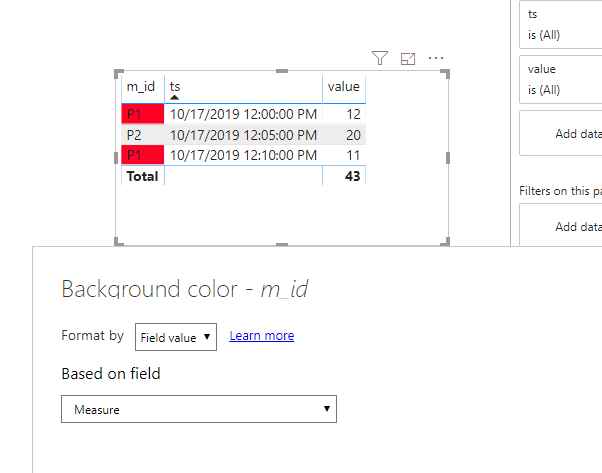
Currently, we cannot set conditional formmating of the background in line chart. We can create a measure and use table visual to work around.


Measure = 
VAR ts =
    MAX ( A[ts] )
VAR mid =
    MAX ( A[m_id] )
VAR typ =
    CALCULATE (
        MAX ( B[type] ),
        FILTER ( B, B[ts_start] <= ts && B[ts_end] >= ts && B[m_id] = mid )
    )
RETURN
    IF ( typ = "Direct", "#FF0027", IF ( typ = "Indirect", "#0040FF", BLANK () ) )

Capture.PNG


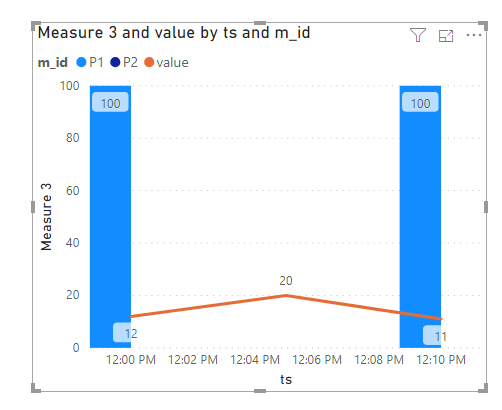
Btw, we can use Line and clustered column chart to work around by a new measure.

Measure 3 = 
VAR ts =
    MAX ( A[ts] )
VAR mid =
    MAX ( A[m_id] )
VAR typ =
    CALCULATE (
        MAX ( B[type] ),
        FILTER ( B, B[ts_start] <= ts && B[ts_end] >= ts && B[m_id] = mid )
    )
RETURN
    IF ( typ = "Direct", 100, IF ( typ = "Indirect",200, BLANK () ) )

co.PNG


Community Support Team _ Frank
If this post helps, then please consider Accept it as the solution to help the others find it more quickly.

View solution in original post

1 REPLY 1
v-frfei-msft
Community Support
Community Support

Hi @johnerlandsson


Currently, we cannot set conditional formmating of the background in line chart. We can create a measure and use table visual to work around.


Measure = 
VAR ts =
    MAX ( A[ts] )
VAR mid =
    MAX ( A[m_id] )
VAR typ =
    CALCULATE (
        MAX ( B[type] ),
        FILTER ( B, B[ts_start] <= ts && B[ts_end] >= ts && B[m_id] = mid )
    )
RETURN
    IF ( typ = "Direct", "#FF0027", IF ( typ = "Indirect", "#0040FF", BLANK () ) )

Capture.PNG


Btw, we can use Line and clustered column chart to work around by a new measure.

Measure 3 = 
VAR ts =
    MAX ( A[ts] )
VAR mid =
    MAX ( A[m_id] )
VAR typ =
    CALCULATE (
        MAX ( B[type] ),
        FILTER ( B, B[ts_start] <= ts && B[ts_end] >= ts && B[m_id] = mid )
    )
RETURN
    IF ( typ = "Direct", 100, IF ( typ = "Indirect",200, BLANK () ) )

co.PNG


Community Support Team _ Frank
If this post helps, then please consider Accept it as the solution to help the others find it more quickly.

Helpful resources

Announcements
Power BI DataViz World Championships

Power BI Dataviz World Championships

Vote for your favorite vizzies from the Power BI World Championship submissions!

Sticker Challenge 2026 Carousel

Join our Community Sticker Challenge 2026

If you love stickers, then you will definitely want to check out our Community Sticker Challenge!

January Power BI Update Carousel

Power BI Monthly Update - January 2026

Check out the January 2026 Power BI update to learn about new features.

FabCon Atlanta 2026 carousel

FabCon Atlanta 2026

Join us at FabCon Atlanta, March 16-20, for the ultimate Fabric, Power BI, AI and SQL community-led event. Save $200 with code FABCOMM.