cancel
Showing results for 
Search instead for 
Did you mean: 

We've captured the moments from FabCon & SQLCon that everyone is talking about, and we are bringing them to the community, live and on-demand. Starts on April 14th. Register now

Reply
Anonymous
Not applicable

Visualizations: Grouped bar chart (help)

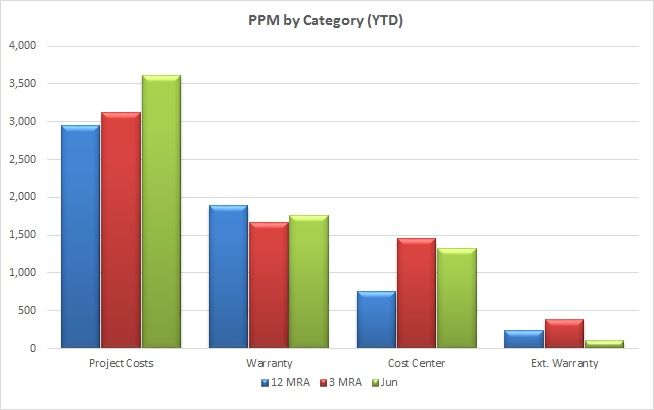
Still a newbie at PBI, but I've been laboring the past few days learning DAX and tables. So now I've finally created a very large table with many measures and calculated columns, but I want to display one row from 12 columns grouped like this:


Analysis.jpg


I should point out that all of the data I need exists in a single table and is organized by date. So, for example, if you went to the row for June 2018 and scanned accross the columns you'd find (among many others) the measures for Cost Center PPM, Warranty PPM, etc. as well as the calculated 3MRA and 12MRA values.


So everything is already there, in one row, but how to I create a column visual that (using a slicer) will extract those specific 12 columns from that selected row and group them as shown.


Is it possible?


5 REPLIES 5
v-juanli-msft
Community Support
Community Support

Hi @Anonymous

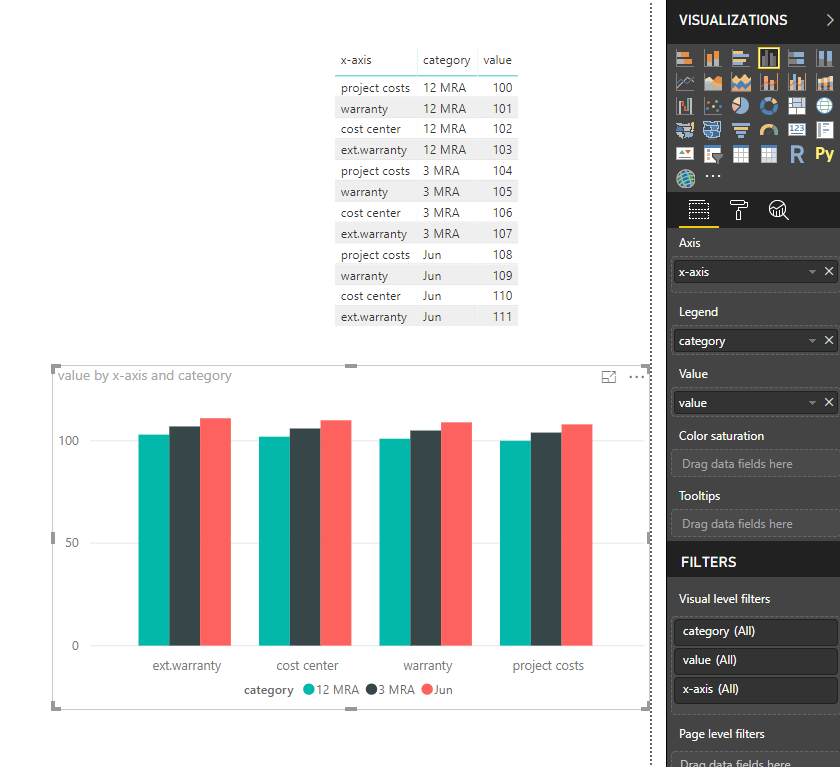
Based on my test, to get the visual like the screenshot, your table should structure as below

6.png


From you second screenshot, your table is not like this, i'm afraid it is neccessary to change the model of your table in Edit Queries.

It would be better to share a table with me.


Best Regards

Maggie

MFelix
Super User
Super User

Hi @Anonymous,


Although you say that the information is all there in your table be aware that in order to have the correct results sometimes the information needs to be in a single column. To what I can understand from your question you have several measures (3MRA, 12 MRA) and then several columns the PPM Categorys. In order to achieve this look and feel you need to make the unpivot of the PPM categorys to  single column and that will allow you to place the Category on the X-axis then add the measures on the values.


However as I said the question is not clear.


Please see this post regarding How to Get Your Question Answered Quickly:

https://community.powerbi.com/t5/Community-Blog/How-to-Get-Your-Question-Answered-Quickly/ba-p/38490 (courtesy of @Greg_Deckler).


Regards,

MFelix


Regards

Miguel Félix


Did I answer your question? Mark my post as a solution!

Proud to be a Super User!

Check out my blog: Power BI em Português


Anonymous
Not applicable

You are correct. As noted, I am a major newbie in PBI and still think like Excel, so my table looks like an Excel data table would. Categories are in columns, and dates are from top to bottom. All data from a given year/month exists in a single row accross.


My actual data has a lot of proprietary info in it, but here is a sampe of what my table looks like (it actually has about 6x this many columns):


2018-09-04_19-34-26.jpg


Can it be done arranged like this?


P.S. I am still trying to convert my thinking process to the Power BI way.

Anonymous
Not applicable

I made this as big as it allows, but to my eye it seems unreadable. Are you able to see the text?

Hi @Anonymous,


Can you share your file? maybe by private message.


Regards,

MFelix


Regards

Miguel Félix


Did I answer your question? Mark my post as a solution!

Proud to be a Super User!

Check out my blog: Power BI em Português


Helpful resources

Announcements
New to Fabric survey Carousel

New to Fabric Survey

If you have recently started exploring Fabric, we'd love to hear how it's going. Your feedback can help with product improvements.

Power BI DataViz World Championships carousel

Power BI DataViz World Championships - June 2026

A new Power BI DataViz World Championship is coming this June! Don't miss out on submitting your entry.

Join our Fabric User Panel

Join our Fabric User Panel

Share feedback directly with Fabric product managers, participate in targeted research studies and influence the Fabric roadmap.

March Power BI Update Carousel

Power BI Community Update - March 2026

Check out the March 2026 Power BI update to learn about new features.