cancel
Showing results for 
Search instead for 
Did you mean: 

Data Days is here! Join us now for 60+ days of learning, challenges, and connection. Learn more

Reply
StuBee
Helper I
Helper I

Visual Level Filters Relative to Page Level

Hi All,


Would anyone know if it is possible to have a visual level filter relative to the page level filter.


For example, having a graph that is set to view last 5 days of work from today (24th Jan). While there is a filter on the page for all graphs to adjust the time period. So when the page level filter is set to a weeks ago(17th Jan), the graph views the last 5 days from 17th back.


Thank you 

1 ACCEPTED SOLUTION
Anonymous
Not applicable

Hi @StuBee ,


Please refer to the measure below instead of a visual level filter.

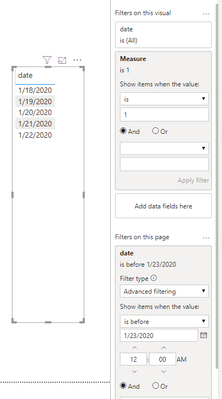
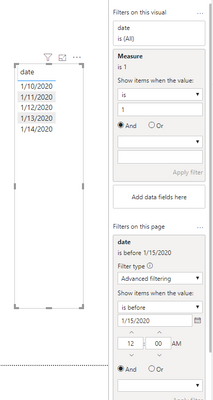
Measure = IF(SELECTEDVALUE('Table'[date])>CALCULATE(MAX('Table'[date]),ALLSELECTED('Table'))-5,1,0)

 Result would be shown as below.

1.PNG2.PNG


Best Regards,

Jay

Community Support Team _ Jay Wang

If this post helps, then please consider Accept it as the solution to help the other members find it more quickly.

View solution in original post

3 REPLIES 3
Anonymous
Not applicable

Hi @StuBee ,


Please refer to the measure below instead of a visual level filter.

Measure = IF(SELECTEDVALUE('Table'[date])>CALCULATE(MAX('Table'[date]),ALLSELECTED('Table'))-5,1,0)

 Result would be shown as below.

1.PNG2.PNG


Best Regards,

Jay

Community Support Team _ Jay Wang

If this post helps, then please consider Accept it as the solution to help the other members find it more quickly.

Anonymous
Not applicable

Power BI gives users the ability to fine tune how a slicer impacts the appearance of other visuals on the report canvas and vice versa. Enabling the Edit interactions option on the Format tab gives authors more options for controlling filters on a per-visual basis.

amitchandak
Super User
Super User

Can a measure like this help?

Rolling last 7 before 7 = CALCULATE(sum(Sales[Sales Amount]),DATESINPERIOD('Date'[Date],(dateadd('Date'[Date],-7,DAY)),-7,DAY))

This needs date table.

To get the best of the time intelligence function. Make sure you have a date calendar and it has been marked as the date in model view. Also, join it with the date column of your fact/s.

Refer
https://radacad.com/creating-calendar-table-in-power-bi-using-dax-functions
https://www.archerpoint.com/blog/Posts/creating-date-table-power-bi

https://www.sqlbi.com/articles/creating-a-simple-date-table-in-dax/

Appreciate your Kudos. In case, this is the solution you are looking for, mark it as the Solution. In case it does not help, please provide additional information and mark me with @
Thanks. My Recent Blog -
Winner-Topper-on-Map-How-to-Color-States-on-a-Map-with-Winners , HR-Analytics-Active-Employee-Hire-and-Termination-trend
Power-BI-Working-with-Non-Standard-Time-Periods And Comparing-Data-Across-Date-Ranges

Connect on Linkedin


Share with Power BI Enthusiasts: Full Power BI Video (20 Hours) YouTube
Microsoft Fabric Series 60+ Videos YouTube
Microsoft Fabric Hindi End to End YouTube

Helpful resources

Announcements
Fabric Data Days is here Carousel

Fabric Data Days 2026

Don't miss out on Data Days, June 15 through August 7. Learn Fabric, Power BI, SQL, AI and more.

May Power BI Update Carousel

Power BI Monthly Update - May 2026

Check out the May 2026 Power BI update to learn about new features.

Power BI DataViz World Championships carousel

Power BI DataViz World Championships - June 2026

A new Power BI DataViz World Championship is coming this June! Don't miss out on submitting your entry.