
Don't miss your chance to take the Fabric Data Engineer (DP-700) exam on us!
Learn moreWe've captured the moments from FabCon & SQLCon that everyone is talking about, and we are bringing them to the community, live and on-demand. Starts on April 14th. Register now
Hi,
I'm using the visual header tooltip on my card visuals and I've noticed that on my laptop, the icon shows up just outside the card visual near the top instead of right next to the title. I've basically removed all the icons except for the visual header tooltip icon. I'm basically using it almost as a help icon for the card, ie defines the info being shown. I'm assuming it's doing this because the laptop screen resolution is much smaller than my desktop. Is there anyway to force it to not re-position the icon based on resolution?
Thanks
HI @id013
Would you mind providing some captures about the problem you encountered?
Hi,
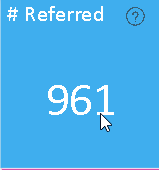
Sure thing. I'm only going to provide a small section of the visualization since I can't share that much data but it should make sense afterwards. So when the visualization is at full screen the tooltip shows as follows:
However if I shrink the visualization on the screen the tooltip (?) moves up above the card visual:
Is there anyway to prevent that from happening?
Thanks
If you have recently started exploring Fabric, we'd love to hear how it's going. Your feedback can help with product improvements.
A new Power BI DataViz World Championship is coming this June! Don't miss out on submitting your entry.
Share feedback directly with Fabric product managers, participate in targeted research studies and influence the Fabric roadmap.
| User | Count |
|---|---|
| 53 | |
| 37 | |
| 35 | |
| 19 | |
| 17 |
| User | Count |
|---|---|
| 73 | |
| 70 | |
| 39 | |
| 34 | |
| 23 |