This is best Fabric, Power BI, SQL and AI community event. How do we know? The last event sold out! Save €200 with code FABCMTY200.
Register nowJuly 28 - August 9 | Final Round of the Power BI Dataviz World Championships. This is your chance. Learn more
Hi,
I'm using the visual header tooltip on my card visuals and I've noticed that on my laptop, the icon shows up just outside the card visual near the top instead of right next to the title. I've basically removed all the icons except for the visual header tooltip icon. I'm basically using it almost as a help icon for the card, ie defines the info being shown. I'm assuming it's doing this because the laptop screen resolution is much smaller than my desktop. Is there anyway to force it to not re-position the icon based on resolution?
Thanks
HI @id013
Would you mind providing some captures about the problem you encountered?
Hi,
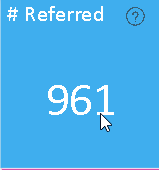
Sure thing. I'm only going to provide a small section of the visualization since I can't share that much data but it should make sense afterwards. So when the visualization is at full screen the tooltip shows as follows:
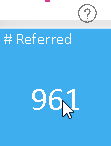
However if I shrink the visualization on the screen the tooltip (?) moves up above the card visual:
Is there anyway to prevent that from happening?
Thanks
Join us in Barcelona for FabCon and SQLCon, the Fabric, Power BI, SQL, and AI community event. Save €200 with code FABCMTY200.
If you love stickers, then you will definitely want to check out our community sticker challenge, Barcelona edition!
Check out the July 2026 Power BI update to learn about new features.
| User | Count |
|---|---|
| 25 | |
| 23 | |
| 19 | |
| 17 | |
| 14 |
| User | Count |
|---|---|
| 25 | |
| 23 | |
| 20 | |
| 20 | |
| 19 |