Learn from the best! Meet the four finalists headed to the FINALS of the Power BI Dataviz World Championships! Register now
I have an visio table/matrix . On the side are names and on top are week days . I want to color the matrix cell depending on the place where the person is . How can i do that ?
Solved! Go to Solution.
Hi @Anonymous,
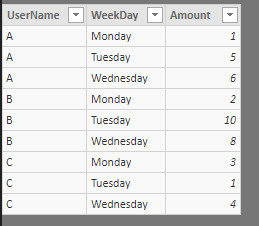
Suppose the source table is like below.
Use a Matrix to display data, and apply conditional formattingto "Values" rather than "Rows" or "Columns".
Best regards,
Yuliana Gu
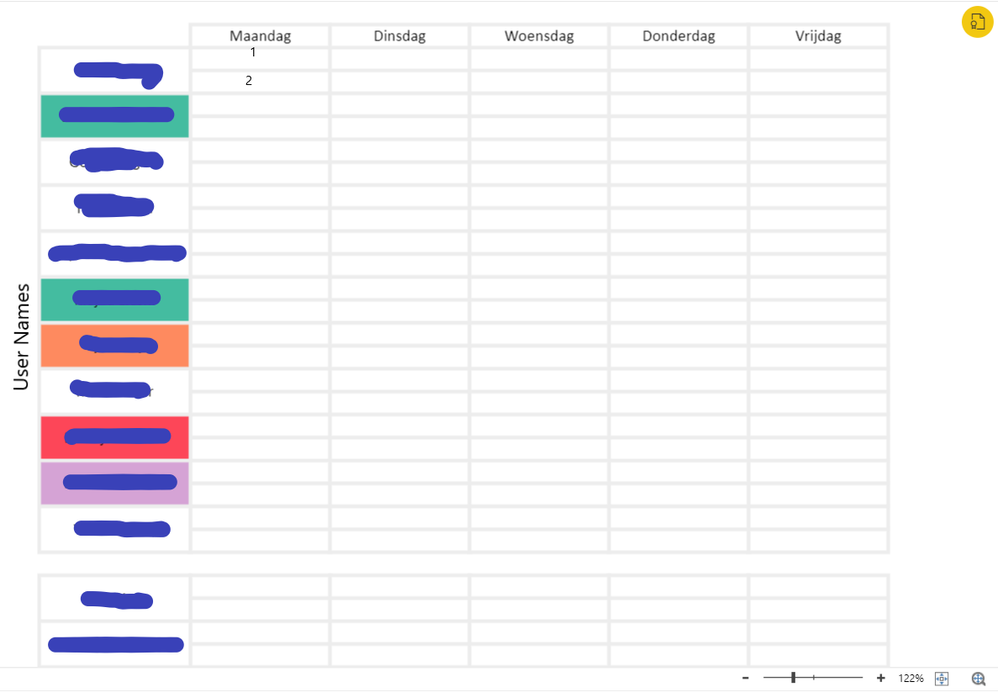
Hi @v-yulgu-msft This is my matrix . at Point 1 wi;l come the Color of a place where that person is on monday morning . And point 2 is the color of the place the person will be on monday for the rest of the day . As you can see , it gets the color on the Users name which is not what i want . How can i fix this ?
Hi @Anonymous,
Suppose the source table is like below.
Use a Matrix to display data, and apply conditional formattingto "Values" rather than "Rows" or "Columns".
Best regards,
Yuliana Gu
@v-yulgu-msft thank you for your time .
But let's supose the source table is not like that , because i don't have just one amount , but three and the values are not numbers but places/names .
How do I formate it by color knowing that the copmarable value is just text ?
And how can i make the usernames show on the table , even if there is no data about them ?
Hi @Anonymous,
Please provide some dummy data.
Regards,
Yuliana Gu
@v-yulgu-msft
Thank you very much for your help . I took your suggestion and I have decited to use just simple Matrix . The point where i am a little stuck is :
If there is no data for a user , then the Name will not display in the matrix . Is there any way to change that ?
Hi @Anonymous,
How is the visio like? What is your desired ouput? Please follow this blog to provide more detailed description.
Best regards,
Yuliana Gu
| User | Count |
|---|---|
| 45 | |
| 36 | |
| 29 | |
| 18 | |
| 17 |
| User | Count |
|---|---|
| 65 | |
| 57 | |
| 40 | |
| 21 | |
| 20 |