Get certified for free when you join Fabric Data Days 2026 and dive into Fabric, Power BI, SQL, AI, and other essential data skills.
Join nowJuly 7 - July 17 | Round 2 of the Power BI Dataviz World Championships. Don't miss your chance! Learn more
Hi
I am a new user of Power BI. I have a very simple table tracking x number of devices, that have been upgraded (status = complete/scheduled), on a particular date and in a particular country.
I would like to use Power BI to improve my statis excel charts.
I would like to create a couple of charts:
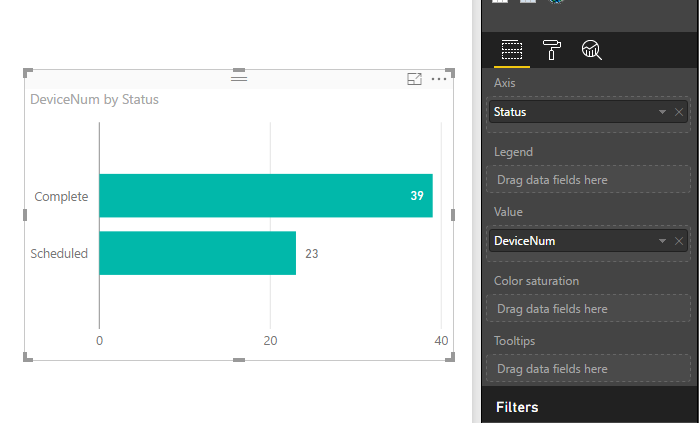
1. the number of devices completed vs scheduled - bar chart.
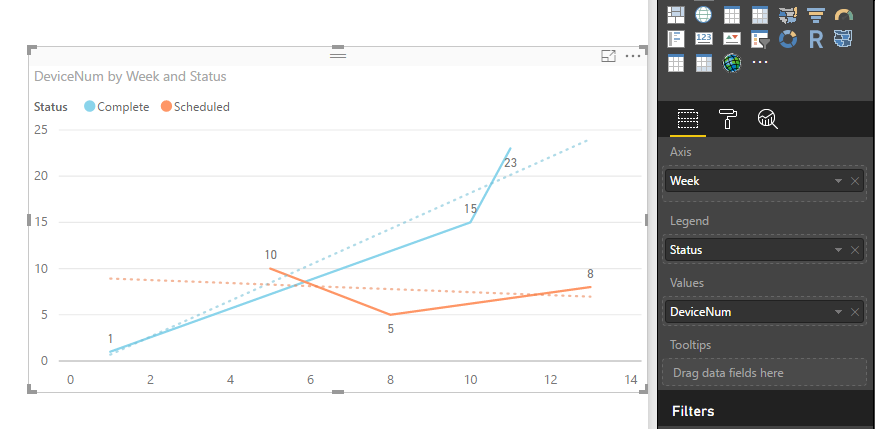
2. the number of devices completed and scheduled per a particular week, potentially with a trend line
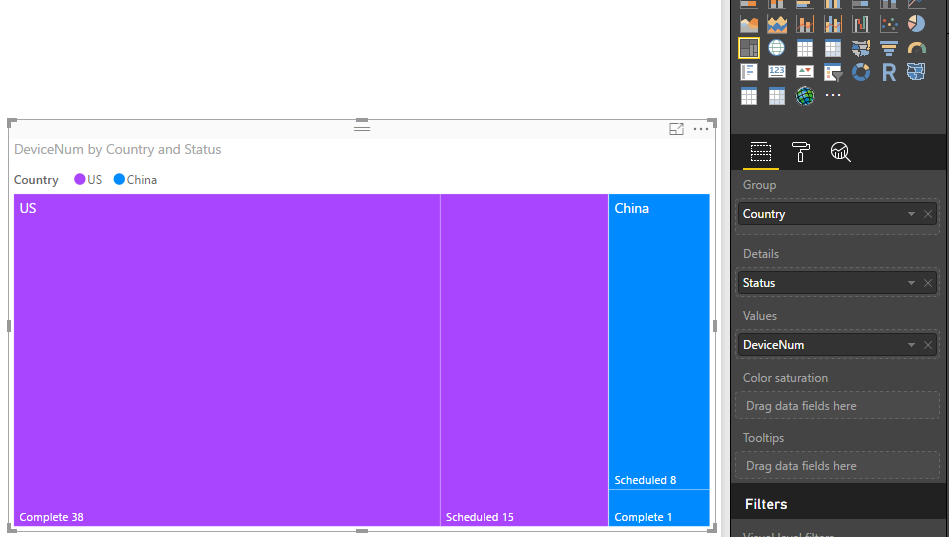
3. a treemap of the number of devices per a country (complete + scheduled
I would very much appreciate some assistance, without the need to code the solution.
Thank you
Chris
Solved! Go to Solution.
Hi @critchie,
Based on your description, I create some sample data to plot chats:
1. You can create a bar chart like below:
2. Create a calendar table, add a calculated column to return week values. Create a relationship between the calendar table and fact table. Add a trend line in a line chart. See: Analytics pane in Power BI Desktop.
3. Create a treemap like below. See: Treemaps in Power BI (Tutorial).
For detail steps, you can download attached .pbix file to have a look.
Best Regards,
Qiuyun Yu
Hi @critchie,
Based on your description, I create some sample data to plot chats:
1. You can create a bar chart like below:
2. Create a calendar table, add a calculated column to return week values. Create a relationship between the calendar table and fact table. Add a trend line in a line chart. See: Analytics pane in Power BI Desktop.
3. Create a treemap like below. See: Treemaps in Power BI (Tutorial).
For detail steps, you can download attached .pbix file to have a look.
Best Regards,
Qiuyun Yu
Hello Qiuyun (you have a very interesting name 😉 )
Thank you for your assistance!
This has massively helped me to improve my dashboard. Especially the calendar week table.
Kind regards
Chris
Hi @critchie,
You're welcome.
Hope you can have fun with Power BI.
Best Regards,
Qiuyun Yu
i suggest going through the guided learning videos on the power Bi site, thats the best way to learn
https://powerbi.microsoft.com/en-us/guided-learning/
Proud to be a Super User!
Join us in Barcelona for FabCon and SQLCon, the Fabric, Power BI, SQL, and AI community event. Save €200 with code FABCMTY200.
Join Fabric Data Days 2026: 60 days of free live/on-demand sessions, challenges, study groups, and certification opportunities.
| User | Count |
|---|---|
| 22 | |
| 18 | |
| 18 | |
| 17 | |
| 13 |
| User | Count |
|---|---|
| 61 | |
| 53 | |
| 47 | |
| 40 | |
| 38 |