We've captured the moments from FabCon & SQLCon that everyone is talking about, and we are bringing them to the community, live and on-demand. Starts on April 14th. Register now
Hi
I am a new user of Power BI. I have a very simple table tracking x number of devices, that have been upgraded (status = complete/scheduled), on a particular date and in a particular country.
I would like to use Power BI to improve my statis excel charts.
I would like to create a couple of charts:
1. the number of devices completed vs scheduled - bar chart.
2. the number of devices completed and scheduled per a particular week, potentially with a trend line
3. a treemap of the number of devices per a country (complete + scheduled
I would very much appreciate some assistance, without the need to code the solution.
Thank you
Chris
Solved! Go to Solution.
Hi @critchie,
Based on your description, I create some sample data to plot chats:
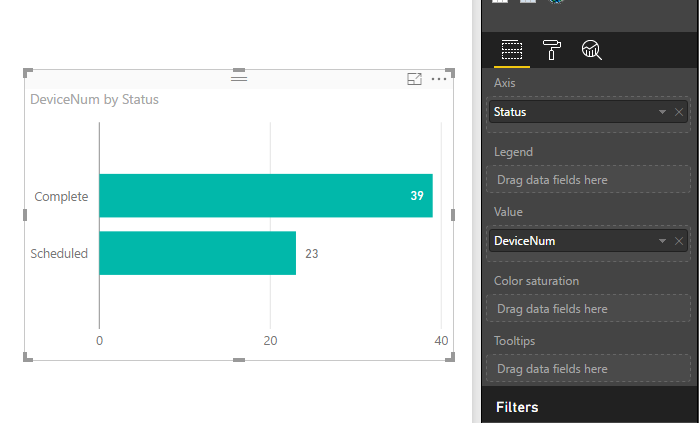
1. You can create a bar chart like below:
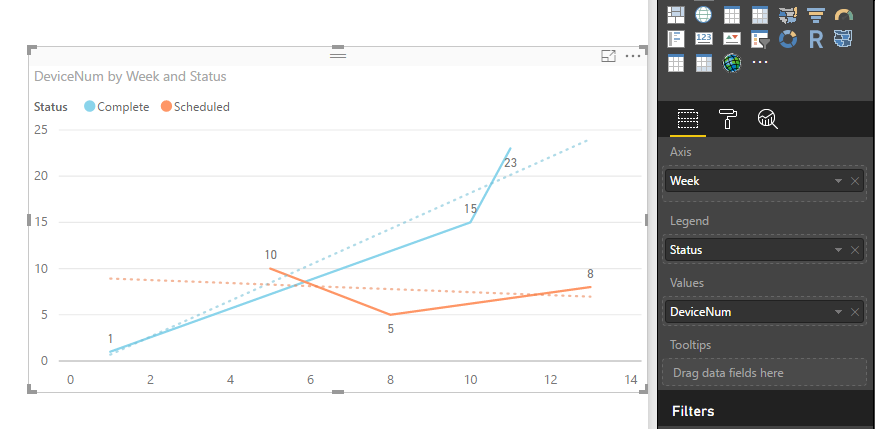
2. Create a calendar table, add a calculated column to return week values. Create a relationship between the calendar table and fact table. Add a trend line in a line chart. See: Analytics pane in Power BI Desktop.
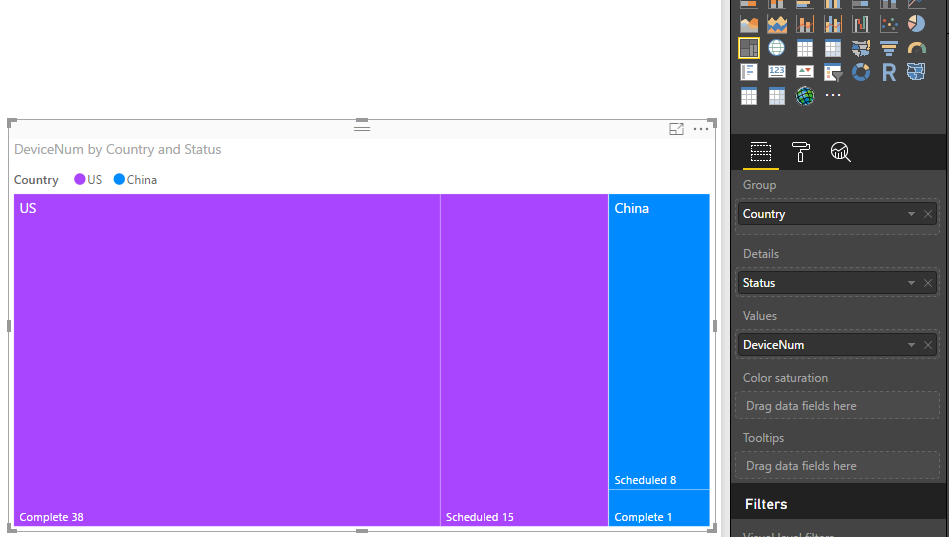
3. Create a treemap like below. See: Treemaps in Power BI (Tutorial).
For detail steps, you can download attached .pbix file to have a look.
Best Regards,
Qiuyun Yu
Hi @critchie,
Based on your description, I create some sample data to plot chats:
1. You can create a bar chart like below:
2. Create a calendar table, add a calculated column to return week values. Create a relationship between the calendar table and fact table. Add a trend line in a line chart. See: Analytics pane in Power BI Desktop.
3. Create a treemap like below. See: Treemaps in Power BI (Tutorial).
For detail steps, you can download attached .pbix file to have a look.
Best Regards,
Qiuyun Yu
Hello Qiuyun (you have a very interesting name 😉 )
Thank you for your assistance!
This has massively helped me to improve my dashboard. Especially the calendar week table.
Kind regards
Chris
Hi @critchie,
You're welcome.
Hope you can have fun with Power BI.
Best Regards,
Qiuyun Yu
i suggest going through the guided learning videos on the power Bi site, thats the best way to learn
https://powerbi.microsoft.com/en-us/guided-learning/
Proud to be a Super User!
If you have recently started exploring Fabric, we'd love to hear how it's going. Your feedback can help with product improvements.
A new Power BI DataViz World Championship is coming this June! Don't miss out on submitting your entry.
Share feedback directly with Fabric product managers, participate in targeted research studies and influence the Fabric roadmap.
| User | Count |
|---|---|
| 53 | |
| 38 | |
| 33 | |
| 17 | |
| 17 |
| User | Count |
|---|---|
| 67 | |
| 63 | |
| 38 | |
| 34 | |
| 22 |