Join us at FabCon Atlanta from March 16 - 20, 2026, for the ultimate Fabric, Power BI, AI and SQL community-led event. Save $200 with code FABCOMM.
Register now!Learn from the best! Meet the four finalists headed to the FINALS of the Power BI Dataviz World Championships! Register now
Hi Everyone,
Im having difficulty in achieving the following, please help.
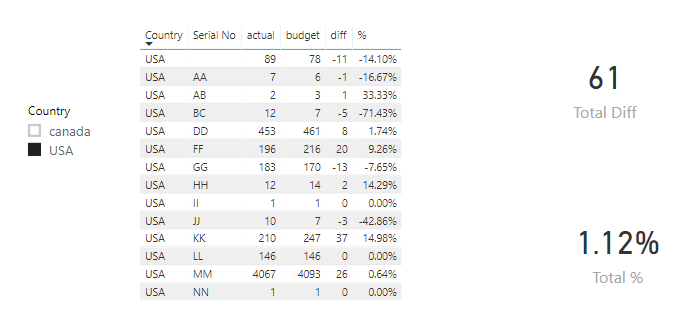
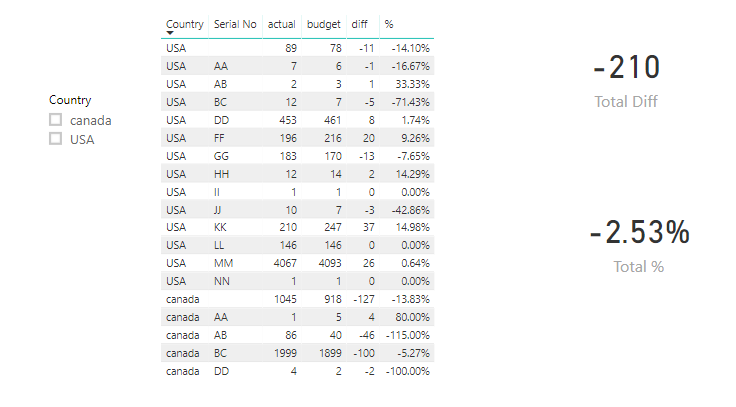
I have created a Table visual as below.
| Country | Serial No | actual | budget | diff | % |
| USA | ? | 89 | 78 | -11 | -14.10% |
| USA | AA | 7 | 6 | -1 | -16.67% |
| USA | AB | 2 | 3 | 1 | 33.33% |
| USA | BC | 12 | 7 | -5 | -71.43% |
| USA | DD | 453 | 461 | 8 | 1.74% |
| USA | FF | 196 | 216 | 20 | 9.26% |
| USA | GG | 183 | 170 | -13 | -7.65% |
| USA | HH | 12 | 14 | 2 | 14.29% |
| USA | II | 1 | 1 | 0 | 0.00% |
| USA | JJ | 10 | 7 | -3 | -42.86% |
| USA | KK | 210 | 247 | 37 | 14.98% |
| USA | LL | 146 | 146 | 0 | 0.00% |
| USA | MM | 4067 | 4093 | 26 | 0.64% |
| USA | NN | 1 | 1 | 0 | 0.00% |
| canada | ? | 1045 | 918 | -127 | -13.83% |
| canada | AA | 1 | 5 | 4 | 80.00% |
| canada | AB | 86 | 40 | -46 | -115.00% |
| canada | BC | 1999 | 1899 | -100 | -5.27% |
| canada | DD | 4 | 2 | -2 | -100.00% |
What i want is:
1) When no county is selected all serial number values should be summed up and show diff and diff in %
2) if any country is selected only serial numbers to that country should be summed and diff and diff in % should be shown
Hi @Mahadevaraobc ,
Please refer to below measures.
Total Diff =
IF (
ISFILTERED ( Table2[Country] ),
CALCULATE ( SUM ( Table2[budget] ), ALL ( Table2[Serial No] ) )
- CALCULATE ( SUM ( Table2[actual] ), ALL ( Table2[Serial No] ) ),
CALCULATE ( SUM ( Table2[budget] ), ALL ( Table2[Country] ) )
- CALCULATE ( SUM ( Table2[actual] ), ALL ( Table2[Country] ) )
)
Total % =
IF (
ISFILTERED ( Table2[Country] ),
DIVIDE (
(
CALCULATE ( SUM ( Table2[budget] ), ALL ( Table2[Serial No] ) )
- CALCULATE ( SUM ( Table2[actual] ), ALL ( Table2[Serial No] ) )
),
CALCULATE ( SUM ( Table2[budget] ), ALL ( Table2[Serial No] ) )
),
DIVIDE (
(
CALCULATE ( SUM ( Table2[budget] ), ALL ( Table2[Country] ) )
- CALCULATE ( SUM ( Table2[actual] ), ALL ( Table2[Country] ) )
),
CALCULATE ( SUM ( Table2[budget] ), ALL ( Table2[Country] ) )
)
)
Best regards,
Yuliana Gu
Thank You,
But this answers part of my question. In my report i need to have serial no combined for all countries and actual, budget should be summed. and diff should be calculated.
eg: in the same above table Sl no for US and Canada should be added, that will be shown as follows
| AA | 8 | 11 | 3 | 27.27% |
Now i will be adding Country as a new filter, so if US is selected table should show only numbers of US
eg :
| AA | 7 | 6 | -1 | -16.67% |
and when canada is selected it should display
| AA | 1 | 5 | 4 | 80.00% |
Hope im clear with my explanation now.
Share feedback directly with Fabric product managers, participate in targeted research studies and influence the Fabric roadmap.
Check out the February 2026 Power BI update to learn about new features.
| User | Count |
|---|---|
| 50 | |
| 49 | |
| 35 | |
| 15 | |
| 14 |
| User | Count |
|---|---|
| 91 | |
| 75 | |
| 41 | |
| 26 | |
| 25 |