
Join us at FabCon Atlanta from March 16 - 20, 2026, for the ultimate Fabric, Power BI, AI and SQL community-led event. Save $200 with code FABCOMM.
Register now!Learn from the best! Meet the four finalists headed to the FINALS of the Power BI Dataviz World Championships! Register now
Hello all,
Loving Power BI, but I stumble there once in a while. I now need to create variance measures to compare my ACT, BUD, PY figures
(e.g. "$ Var ACT vs BUD"). I managed to create the needed variance measures, and they work fine - my rows (e.g. products, regions, sub-product) filter them out perfectly, but that is happening in a separate table, though.
However, when I want to put them into my Matrix visualization, they are affected by my Column 'Actuality name' which shows ACT, BUD and PY (outlined in red) figures that come from a single value column ('YTD') in my Facts table. I would like to put my variance measures right of the ACT,BUD, PY figures (outlined in green).
Ideally, I do not want to create new Actual, Budget, Prior Year measures and drop them into the Values area one by one (which probably would be the easiest method?).
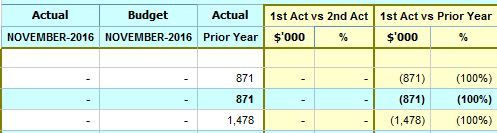
Hence, I am looking for a DAX formula, the results of which are not affected by the Actuality names as Columns. The outcome should be something like this:
My fact table view:
Column ACT: has all the actuality names (e.g. ACT, BUD, PY, FC, BUD1, BUD2 etc)
Column YTD: is my value column in this case.
Thanks
Ged
Update:
I was able to sort my case with creating separate measures for Actual, Budget, Prior Year figures. However, I do not see that as a sustainable solution as this leads a whole lot of customization, which I am trying to avoid as much as I can. It also, is impacting on the performance - all those FILTER clauses that scan every row.
Hence, I would be grateful for any other approach.
Share feedback directly with Fabric product managers, participate in targeted research studies and influence the Fabric roadmap.
Check out the February 2026 Power BI update to learn about new features.
| User | Count |
|---|---|
| 62 | |
| 55 | |
| 39 | |
| 16 | |
| 15 |
| User | Count |
|---|---|
| 93 | |
| 84 | |
| 33 | |
| 31 | |
| 25 |