Join us at FabCon Atlanta from March 16 - 20, 2026, for the ultimate Fabric, Power BI, AI and SQL community-led event. Save $200 with code FABCOMM.
Register now!The Power BI Data Visualization World Championships is back! It's time to submit your entry. Live now!
Hi everybody !
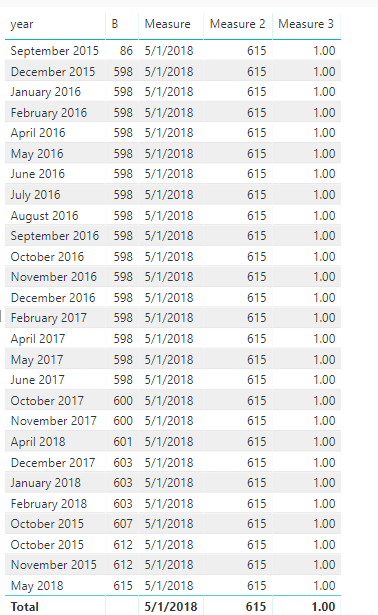
Here is my table :
I want to create a measure with another value named A (which is constant) divide by my second column named B. In fact, I have a slicer with each dates but when I diselected my date, there is All.
I want when All appear on my slicer, a measure with A divide by the last B here 615.
So I try :
C = IF (
DISTINCTCOUNT ( 'Données'[Date] ) = 1;
SUM ( B);
Lastnonblank(B;"")
))
It worked but it divide A by 600 (november 2017), so strange..
Thanks
Best regards
David
Solved! Go to Solution.
Hi @DavidB023
I make a test with your data on my site.
Create measures
Measure = CALCULATE(LASTDATE(Sheet1[year]),ALL(Sheet1))
Measure 2 = CALCULATE(LASTNONBLANK(Sheet1[B],1),FILTER(ALL(Sheet1),[year]=[Measure]))
Measure 3 = DIVIDE(615,[Measure 2])
Best Regards
Maggie
Hi @DavidB023
I make a test with your data on my site.
Create measures
Measure = CALCULATE(LASTDATE(Sheet1[year]),ALL(Sheet1))
Measure 2 = CALCULATE(LASTNONBLANK(Sheet1[B],1),FILTER(ALL(Sheet1),[year]=[Measure]))
Measure 3 = DIVIDE(615,[Measure 2])
Best Regards
Maggie
Hi @v-juanli-msft,
Thanks a lot for your solution !
Finally I used your Measure and Measure2 and I inject in :
Measure3 = DIVIDE( A ;
IF( DISTINCTCOUNT ( 'Sheet1'[year] ) = 1 ;
B ;
[Mesure2]
))
It works like I want,
Thanks
Best regards
David
| User | Count |
|---|---|
| 53 | |
| 40 | |
| 35 | |
| 24 | |
| 22 |
| User | Count |
|---|---|
| 134 | |
| 107 | |
| 57 | |
| 43 | |
| 38 |