Join us at FabCon Atlanta from March 16 - 20, 2026, for the ultimate Fabric, Power BI, AI and SQL community-led event. Save $200 with code FABCOMM.
Register now!The Power BI Data Visualization World Championships is back! It's time to submit your entry. Live now!
Hi everybody !
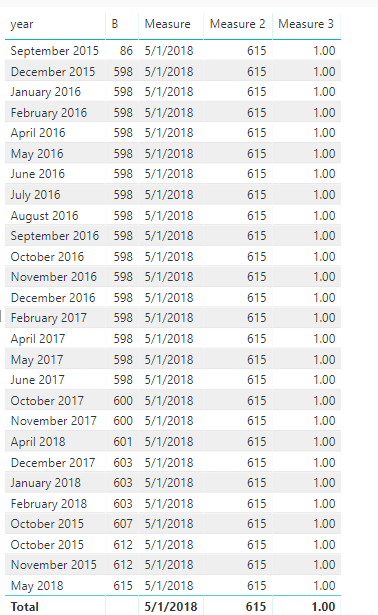
Here is my table :
I want to create a measure with another value named A (which is constant) divide by my second column named B. In fact, I have a slicer with each dates but when I diselected my date, there is All.
I want when All appear on my slicer, a measure with A divide by the last B here 615.
So I try :
C = IF (
DISTINCTCOUNT ( 'Données'[Date] ) = 1;
SUM ( B);
Lastnonblank(B;"")
))
It worked but it divide A by 600 (november 2017), so strange..
Thanks
Best regards
David
Solved! Go to Solution.
Hi @DavidB023
I make a test with your data on my site.
Create measures
Measure = CALCULATE(LASTDATE(Sheet1[year]),ALL(Sheet1))
Measure 2 = CALCULATE(LASTNONBLANK(Sheet1[B],1),FILTER(ALL(Sheet1),[year]=[Measure]))
Measure 3 = DIVIDE(615,[Measure 2])
Best Regards
Maggie
Hi @DavidB023
I make a test with your data on my site.
Create measures
Measure = CALCULATE(LASTDATE(Sheet1[year]),ALL(Sheet1))
Measure 2 = CALCULATE(LASTNONBLANK(Sheet1[B],1),FILTER(ALL(Sheet1),[year]=[Measure]))
Measure 3 = DIVIDE(615,[Measure 2])
Best Regards
Maggie
Hi @v-juanli-msft,
Thanks a lot for your solution !
Finally I used your Measure and Measure2 and I inject in :
Measure3 = DIVIDE( A ;
IF( DISTINCTCOUNT ( 'Sheet1'[year] ) = 1 ;
B ;
[Mesure2]
))
It works like I want,
Thanks
Best regards
David
The Power BI Data Visualization World Championships is back! It's time to submit your entry.
Check out the January 2026 Power BI update to learn about new features.
| User | Count |
|---|---|
| 60 | |
| 49 | |
| 30 | |
| 25 | |
| 23 |
| User | Count |
|---|---|
| 128 | |
| 102 | |
| 57 | |
| 39 | |
| 31 |