cancel
Showing results for 
Search instead for 
Did you mean: 

The Power BI Data Visualization World Championships is back! Get ahead of the game and start preparing now! Learn more

Reply
cham
Post Patron
Post Patron

VAR formula with multiple return values

Hi,


I have data set with week1 , week2, week3, week4 and with the staus of "Completed", "inprogress" and "Failed".


I used below formul to do the conditional formatting in my data set since it has text values.

This formulas is only works for "Completed". I want to created this formulas to highlight "Inprogress and "Failed" status as well.


Also I want to apply this same formul to week2,3,4 as well.


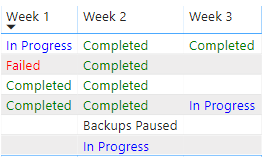
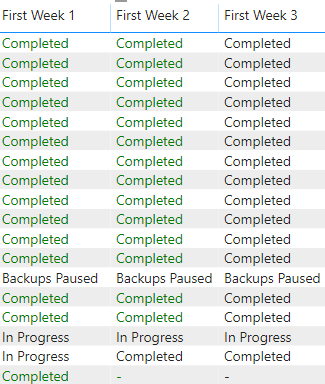
When I add this formula to week 2 it will hight the same values in week 1. Please check the attached picture.


Can anyone help me to do this


Week Colour =
VAR w1 = SELECTEDVALUE('JAN-2020'[Week 1])
VAR w2 = SELECTEDVALUE('JAN-2020'[Week 2])
VAR w3 = SELECTEDVALUE('JAN-2020'[Week 3])
VAR w4 = SELECTEDVALUE('JAN-2020'[Week 4])

return IF(w1= "Completed", "Green")
 
Capture1.PNG
1 ACCEPTED SOLUTION
v-gizhi-msft
Community Support
Community Support

Hi,


According to your description, I create a simple sample to test:
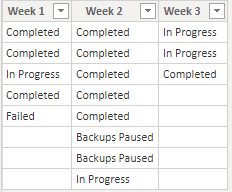
121.PNG

The issue is because that you apply one measure to all columns.

So for each row, it will show the same color regardless of the value, like this:

color = 
var w1 = SELECTEDVALUE('Table'[Week 1])
var w2 = SELECTEDVALUE('Table'[Week 2])
var w3 = SELECTEDVALUE('Table'[Week 3])
return
SWITCH(true,w1="Completed","Green",w1="In Progress","Blue",w1="Failed","Red",
            w2="Completed","Green",w2="In Progress","Blue",w2="Failed","Red",
            w3="Completed","Green",w3="In Progress","Blue",w3="Failed","Red"
)
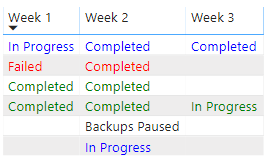
124.PNG

Please try to create measures for each week:

Measure 1 = SWITCH(SELECTEDVALUE('Table'[Week 1]),"Completed","Green","In Progress","Blue","Failed","Red")
Measure 2 = SWITCH(SELECTEDVALUE('Table'[Week 2]),"Completed","Green","In Progress","Blue","Failed","Red")
Measure 3 = SWITCH(SELECTEDVALUE('Table'[Week 3]),"Completed","Green","In Progress","Blue","Failed","Red")

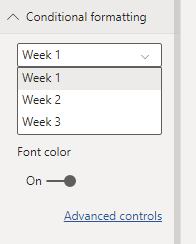
Then apply these to each week's font color:
123.PNG

And the result shows:

122.PNG

Hope this helps.


Best Regards,

Giotto Zhi

View solution in original post

5 REPLIES 5
v-gizhi-msft
Community Support
Community Support

Hi,


According to your description, I create a simple sample to test:

121.PNG

The issue is because that you apply one measure to all columns.

So for each row, it will show the same color regardless of the value, like this:

color = 
var w1 = SELECTEDVALUE('Table'[Week 1])
var w2 = SELECTEDVALUE('Table'[Week 2])
var w3 = SELECTEDVALUE('Table'[Week 3])
return
SWITCH(true,w1="Completed","Green",w1="In Progress","Blue",w1="Failed","Red",
            w2="Completed","Green",w2="In Progress","Blue",w2="Failed","Red",
            w3="Completed","Green",w3="In Progress","Blue",w3="Failed","Red"
)

124.PNG

Please try to create measures for each week:

Measure 1 = SWITCH(SELECTEDVALUE('Table'[Week 1]),"Completed","Green","In Progress","Blue","Failed","Red")
Measure 2 = SWITCH(SELECTEDVALUE('Table'[Week 2]),"Completed","Green","In Progress","Blue","Failed","Red")
Measure 3 = SWITCH(SELECTEDVALUE('Table'[Week 3]),"Completed","Green","In Progress","Blue","Failed","Red")

Then apply these to each week's font color:

123.PNG

And the result shows:

122.PNG

Hope this helps.


Best Regards,

Giotto Zhi

Thank you @v-gizhi-msft 

Anonymous
Not applicable

Hi,


If you want to add conditionnal formating within a table or matrix, I would recommend to use the conditionnal formating option in th e vizualization panel.


Please see the below article :

https://docs.microsoft.com/en-us/power-bi/desktop-conditional-table-formatting


Hope it will help 🙂

Hi @Anonymous ,


Since I have text values in my data set I cannot use conditional formatting. I already treid that. That's why I used this formula. Can you help me with this formula. Or any other way?

Anonymous
Not applicable

Hi,


Can you share the pbix file with me ?


I think you should create a new table with the status + ID (Number) and used the ID to do the conditionnal formating.


But I need to see how did you build your data model.


Thanks

Helpful resources

Announcements
Power BI DataViz World Championships

Power BI Dataviz World Championships

The Power BI Data Visualization World Championships is back! Get ahead of the game and start preparing now!

December 2025 Power BI Update Carousel

Power BI Monthly Update - December 2025

Check out the December 2025 Power BI Holiday Recap!

FabCon Atlanta 2026 carousel

FabCon Atlanta 2026

Join us at FabCon Atlanta, March 16-20, for the ultimate Fabric, Power BI, AI and SQL community-led event. Save $200 with code FABCOMM.