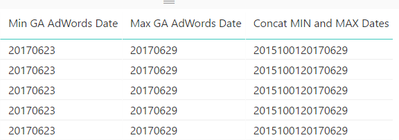
I'm trying to create a calculated column that dynamically constructs a URL based on a value in the host table and the minimum and maximum dates in the filter context of the visualisation.
I'm running into problems because the filter context of the visualization doesn't work if I try to calculate minimum and maximum dates in a calculated column. It does work if I refer to a measure in that calculated column but then when I try and concatenate two measures in a column the filters are lost again. I have to use a calculated column because I want to the URL string to behave as a URL.
Is there a way around this problem?
// Works, filter context from the visualisation is applied
Min Date Measure = FORMAT(min('MyTable'[Date]),"YYYYMMDD")
Max Date Measure = FORMAT(max('MyTable'[Date]),"YYYYMMDD")
Min Date Calculated Column = [Min Date Measure]
Max Date Calculated Column = [Max Date Measure]

// Doesn't work, filter context not applied so you get the min and max dates in the entire table
MIN and MAX Dates  Calculated Column = [Min Date Measure]&[Max Date Measure]

//Doesn't work, because measures can't be formatted as a URLs
MIN and MAX Dates  Measure = [Min Date Measure]&[Max Date Measure]