cancel
Showing results for 
Search instead for 
Did you mean: 

The Power BI Data Visualization World Championships is back! Get ahead of the game and start preparing now! Learn more

Reply
PeterGarant
Helper I
Helper I

Time Zones

Hi all


I have a problem with timezones. Our SQL server logs time in UTC, and our local machines are in UTC +1 (or +2 depending on DST).


So right now when I get data with time in it I know that the time is UTC, but Power BI sees it as local time when I import it.


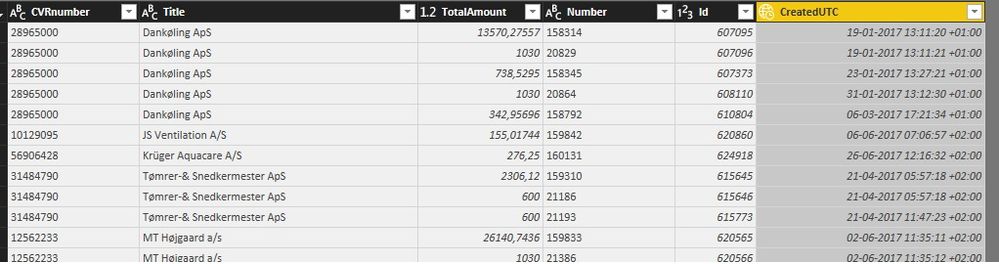
Is there a way for me to tell Power BI that the time in the column is UTC so that I can convert it to local?Example.jpg


Example of output I have:

19-01-2017 13:11:20 +01:00


What I would like to see when converting to local time:

19-01-2017 14:11:20


When I convert it to local time I get the same value as the example. But if i convert it to UTC, then i get 12:11:20 (So the wrong way around).


I hope I have made it somewhat clear as to what my problem is, otherwise don't hessitate to ask.


Kind regards

Peter

1 ACCEPTED SOLUTION

Hi @PeterGarant,


Based on my test, you can just use the formula below to add a custom column to get the expected Local time. Smiley Happy

= DateTimeZone.RemoveZone([CreatedUTC]) + #duration(0, DateTimeZone.ZoneHours([CreatedUTC]), 0, 0)


Regards

View solution in original post

4 REPLIES 4
Greg_Deckler
Community Champion
Community Champion

You could split your UTC time field so that you get the offset and then create a column that adds or subtracts that time as appropriate.


Follow on LinkedIn
@ me in replies or I'll lose your thread!!!
Instead of a Kudo, please vote for this idea
Become an expert!: Enterprise DNA
External Tools: MSHGQM
YouTube Channel!: Microsoft Hates Greg
Latest book!:
DAX For Humans

DAX is easy, CALCULATE makes DAX hard...

That could be a way of doing it yeah, thanks for the idea. But I'm still wondering why there isn't a function to tell PBI what the time in a column is.


But guess that could come in a future release.

Hi @PeterGarant,


Based on my test, you can just use the formula below to add a custom column to get the expected Local time. Smiley Happy

= DateTimeZone.RemoveZone([CreatedUTC]) + #duration(0, DateTimeZone.ZoneHours([CreatedUTC]), 0, 0)


Regards

That works like a charm, thank you very much.

Helpful resources

Announcements
Power BI DataViz World Championships

Power BI Dataviz World Championships

The Power BI Data Visualization World Championships is back! Get ahead of the game and start preparing now!

December 2025 Power BI Update Carousel

Power BI Monthly Update - December 2025

Check out the December 2025 Power BI Holiday Recap!

FabCon Atlanta 2026 carousel

FabCon Atlanta 2026

Join us at FabCon Atlanta, March 16-20, for the ultimate Fabric, Power BI, AI and SQL community-led event. Save $200 with code FABCOMM.