
cancel
Showing results for 
Search instead for 
Did you mean: 

Level up your Power BI skills this month - build one visual each week and tell better stories with data! Get started

Reply
angevin17
Microsoft Employee
Microsoft Employee

Using a measure with filtered data

Hello,


I have a measure that adds up a column and then divides each row in that column by the total of the column (calculating percentage). However, when I filter by a different column, the original total of the column changes. I am trying to make it so the total of the column will not change even when filters are applied.


I want it to look like the yellow where if you filter something out, it will still take that number into account when computing the total. Hoping to modify my measure/create a new one that can do this.


angevin17_0-1627667069986.png

Thank you for all the help!!

1 ACCEPTED SOLUTION
Jihwan_Kim
Super User
Super User

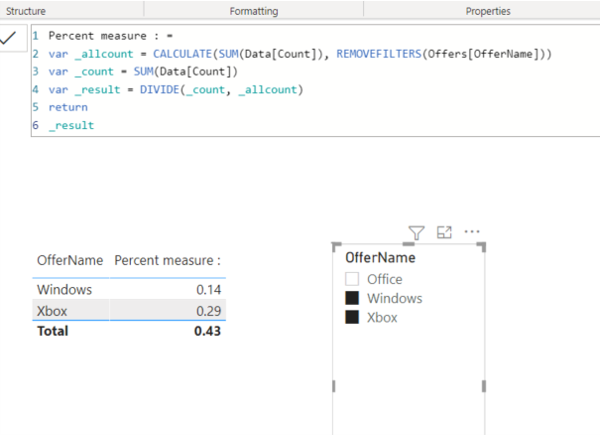
Picture1.png


Percent measure : =
VAR _allcount =
CALCULATE ( SUM ( Data[Count] ), REMOVEFILTERS ( Offers[OfferName] ) )
VAR _count =
SUM ( Data[Count] )
VAR _result =
DIVIDE ( _count, _allcount )
RETURN
_result


Link to the sample pbix file 


If this post helps, then please consider accepting it as the solution to help other members find it faster, and give a big thumbs up.


Click here to visit my LinkedIn page

View solution in original post

2 REPLIES 2
Jihwan_Kim
Super User
Super User

Picture1.png


Percent measure : =
VAR _allcount =
CALCULATE ( SUM ( Data[Count] ), REMOVEFILTERS ( Offers[OfferName] ) )
VAR _count =
SUM ( Data[Count] )
VAR _result =
DIVIDE ( _count, _allcount )
RETURN
_result


Link to the sample pbix file 


If this post helps, then please consider accepting it as the solution to help other members find it faster, and give a big thumbs up.


Click here to visit my LinkedIn page

Greg_Deckler
Community Champion
Community Champion

@angevin17 You will need an ALL statement in your measure somewhere.


Follow on LinkedIn
@ me in replies or I'll lose your thread!!!
Instead of a Kudo, please vote for this idea
Become an expert!: Enterprise DNA
External Tools: MSHGQM
YouTube Channel!: Microsoft Hates Greg
Latest book!:
DAX For Humans

DAX is easy, CALCULATE makes DAX hard...

Helpful resources

Announcements
April Power BI Update Carousel

Power BI Monthly Update - April 2026

Check out the April 2026 Power BI update to learn about new features.

Fabric SQL PBI Data Days

Data Days 2026 coming soon!

Sign up to receive a private message when registration opens and key events begin.

New to Fabric survey Carousel

New to Fabric Survey

If you have recently started exploring Fabric, we'd love to hear how it's going. Your feedback can help with product improvements.

Power BI DataViz World Championships carousel

Power BI DataViz World Championships - June 2026

A new Power BI DataViz World Championship is coming this June! Don't miss out on submitting your entry.