
Get certified for free when you join Fabric Data Days 2026 and dive into Fabric, Power BI, SQL, AI, and other essential data skills.
Join nowJuly 7 - July 17 | Round 2 of the Power BI Dataviz World Championships. Don't miss your chance! Learn more
Hello,
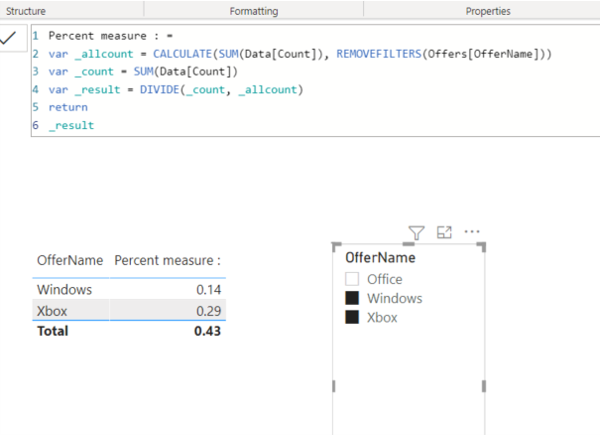
I have a measure that adds up a column and then divides each row in that column by the total of the column (calculating percentage). However, when I filter by a different column, the original total of the column changes. I am trying to make it so the total of the column will not change even when filters are applied.
I want it to look like the yellow where if you filter something out, it will still take that number into account when computing the total. Hoping to modify my measure/create a new one that can do this.
Thank you for all the help!!
Solved! Go to Solution.
Percent measure : =
VAR _allcount =
CALCULATE ( SUM ( Data[Count] ), REMOVEFILTERS ( Offers[OfferName] ) )
VAR _count =
SUM ( Data[Count] )
VAR _result =
DIVIDE ( _count, _allcount )
RETURN
_result
Percent measure : =
VAR _allcount =
CALCULATE ( SUM ( Data[Count] ), REMOVEFILTERS ( Offers[OfferName] ) )
VAR _count =
SUM ( Data[Count] )
VAR _result =
DIVIDE ( _count, _allcount )
RETURN
_result
@angevin17 You will need an ALL statement in your measure somewhere.
Join us in Barcelona for FabCon and SQLCon, the Fabric, Power BI, SQL, and AI community event. Save €200 with code FABCMTY200.
Join Fabric Data Days 2026: 60 days of free live/on-demand sessions, challenges, study groups, and certification opportunities.
| User | Count |
|---|---|
| 22 | |
| 22 | |
| 18 | |
| 16 | |
| 13 |
| User | Count |
|---|---|
| 63 | |
| 42 | |
| 40 | |
| 40 | |
| 38 |