
Get certified for free when you join Fabric Data Days 2026 and dive into Fabric, Power BI, SQL, AI, and other essential data skills.
Join nowTry your skills in the Power BI Dataviz World Championship! Round one ends June 26. Join now
Hello,
I have a measure that adds up a column and then divides each row in that column by the total of the column (calculating percentage). However, when I filter by a different column, the original total of the column changes. I am trying to make it so the total of the column will not change even when filters are applied.
I want it to look like the yellow where if you filter something out, it will still take that number into account when computing the total. Hoping to modify my measure/create a new one that can do this.
Thank you for all the help!!
Solved! Go to Solution.
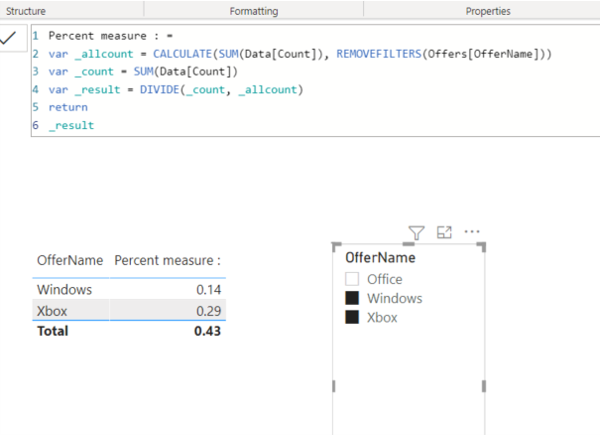
Percent measure : =
VAR _allcount =
CALCULATE ( SUM ( Data[Count] ), REMOVEFILTERS ( Offers[OfferName] ) )
VAR _count =
SUM ( Data[Count] )
VAR _result =
DIVIDE ( _count, _allcount )
RETURN
_result
Percent measure : =
VAR _allcount =
CALCULATE ( SUM ( Data[Count] ), REMOVEFILTERS ( Offers[OfferName] ) )
VAR _count =
SUM ( Data[Count] )
VAR _result =
DIVIDE ( _count, _allcount )
RETURN
_result
@angevin17 You will need an ALL statement in your measure somewhere.
Don't miss out on Data Days, June 15 through August 7. Learn Fabric, Power BI, SQL, AI and more.
Check out the May 2026 Power BI update to learn about new features.
| User | Count |
|---|---|
| 22 | |
| 21 | |
| 21 | |
| 18 | |
| 11 |
| User | Count |
|---|---|
| 58 | |
| 55 | |
| 42 | |
| 36 | |
| 34 |