Join us at FabCon Atlanta from March 16 - 20, 2026, for the ultimate Fabric, Power BI, AI and SQL community-led event. Save $200 with code FABCOMM.
Register now!Get Fabric certified for FREE! Don't miss your chance! Learn more
New guy question,
I am trying to do a YOY comparison of a certain metric with a water fall chart. I find that power BI can not display the Previous period as well as the current period one.
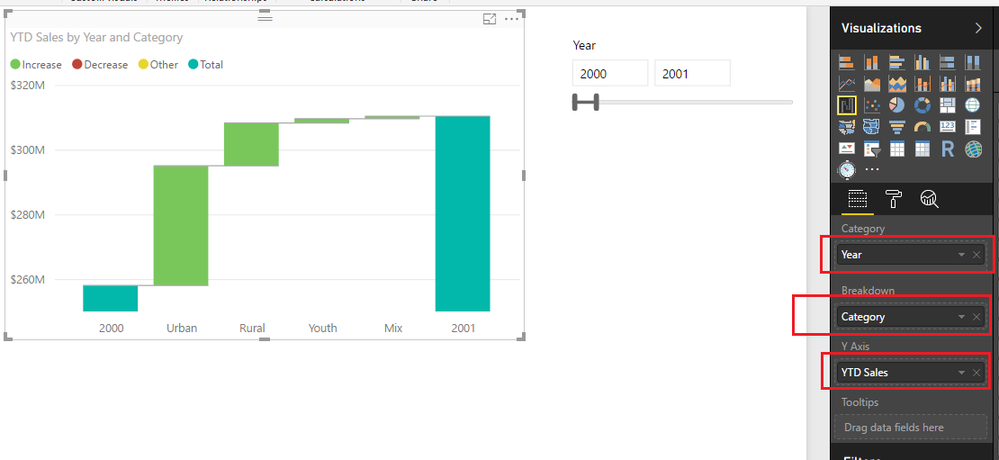
Below is the chart with the country break out in the category and YTD in the Y axis.
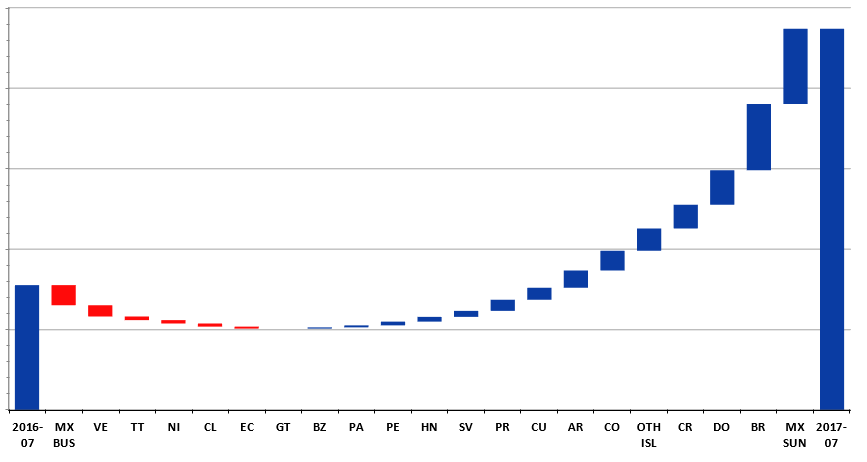
The chart below( blue bars) is an example of a waterfall chart that i am trying to replicate in Power BI as you can see the same style, However, the first bar is a the sameperiodlastyear for the selected period. This chart below is a pain to update. Recreating this report in power will save tons of time.
Solved! Go to Solution.
Regards
Miguel Félix
Proud to be a Super User!
Check out my blog: Power BI em PortuguêsI think this will work, thanks for the assistance. 🙂
Regards
Miguel Félix
Proud to be a Super User!
Check out my blog: Power BI em PortuguêsShare feedback directly with Fabric product managers, participate in targeted research studies and influence the Fabric roadmap.
Check out the February 2026 Power BI update to learn about new features.
| User | Count |
|---|---|
| 68 | |
| 59 | |
| 48 | |
| 20 | |
| 16 |
| User | Count |
|---|---|
| 107 | |
| 106 | |
| 39 | |
| 27 | |
| 27 |