cancel
Showing results for 
Search instead for 
Did you mean: 

Try your skills in the Power BI Dataviz World Championship! Round one ends June 26. Join now

Reply
MrNoob
Helper II
Helper II

Using Waterfall Charts

New guy question,

I am trying to do a YOY comparison of a certain metric with a water fall chart.  I find that power BI can not display the Previous period as well as the current period one.


Below is the chart with the country break out in the category and YTD in the Y axis.


Waterfall BI.PNG


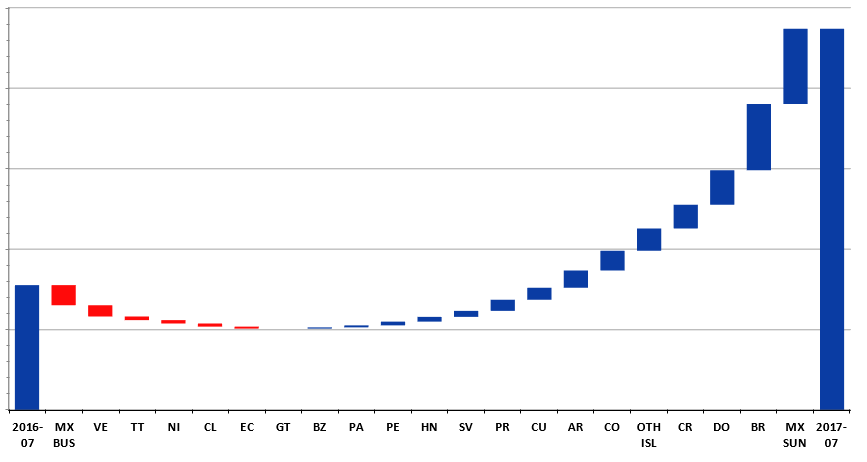
The chart below( blue bars)  is an example of a waterfall chart that i am trying to replicate in Power BI  as you can see the same style, However, the first bar is a the sameperiodlastyear for the selected period.  This chart below is a pain to update.  Recreating this report in power will save tons of time.  


Waterfall excel.PNG

1 ACCEPTED SOLUTION
MFelix
Super User
Super User

Hi @MrNoob,

You can use the breakdown feature to achieve this. Check the link below

https://powerbi.microsoft.com/en-us/documentation/powerbi-service-tutorial-waterfall-charts/

Regards,
MFelix

Regards

Miguel Félix


Did I answer your question? Mark my post as a solution!

Proud to be a Super User!

Check out my blog: Power BI em Português


View solution in original post

3 REPLIES 3
v-ljerr-msft
Microsoft Employee
Microsoft Employee

Hi @MrNoob,


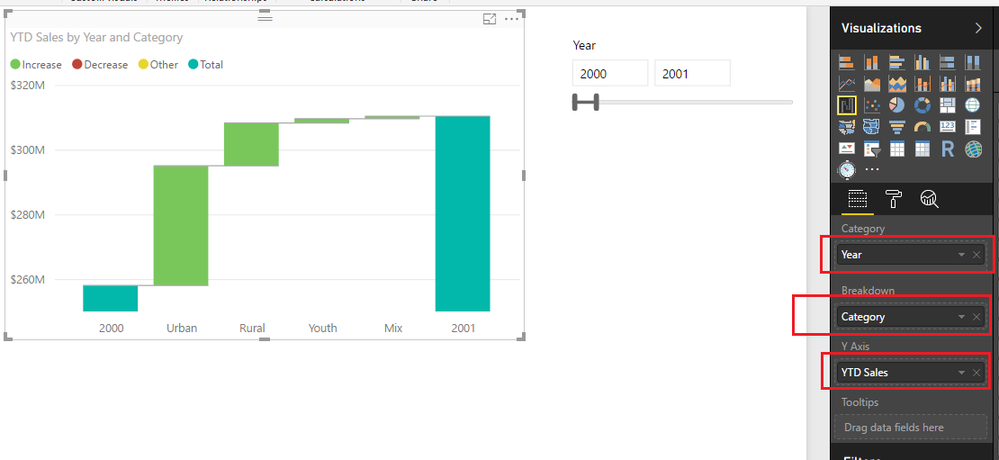
Have you tried using break down option(like below) as @MFelix mentioned above? Does it work in your scenario? If it works, could you accept it as solution to close this thread?


r1.PNG


If you still have any question on this issue, feel free to post here. Smiley Happy


Regards

I think this will work, thanks for the assistance. 🙂

MFelix
Super User
Super User

Hi @MrNoob,

You can use the breakdown feature to achieve this. Check the link below

https://powerbi.microsoft.com/en-us/documentation/powerbi-service-tutorial-waterfall-charts/

Regards,
MFelix

Regards

Miguel Félix


Did I answer your question? Mark my post as a solution!

Proud to be a Super User!

Check out my blog: Power BI em Português


Helpful resources

Announcements
Fabric Data Days is here Carousel

Data Days 2026

Don't miss out on Data Days, June 15 through August 7. Learn Fabric, Power BI, SQL, AI and more.

Power BI DataViz World Championships carousel

Power BI DataViz World Championships - June 2026

A new Power BI DataViz World Championship is coming this June! Don't miss out on submitting your entry.