This is best Fabric, Power BI, SQL and AI community event. How do we know? The last event sold out! Save €200 with code FABCMTY200.
Register nowA new Data Days event is coming soon! This time we’re going bigger than ever. Fabric, Power BI, SQL, AI and more. Don't miss out.
Is something like this possible in a calculated column? I want to create these sort of bins for multiple columns and want to do it the most efficient way possible. If there is another built-in method in power BI, feel free to share. I just want bins that are somewhat evenly populated.
Solved! Go to Solution.
Hi @rawiswarden ,
Sorry for that We cannot find an effective way to add variables with a column and use it the PERCENTILE.INC function.
But we can simplify the formula as following, If you want to create another measure such as yearly, just chang the Dimension_Portstats[MonthlyIncome] to the column in this formula.
Monthly Income (Bin) =
VAR __Column = Dimension_Portstats[MonthlyIncome]
VAR __25pct = PERCENTILE.INC(Dimension_Portstats[MonthlyIncome], 0.25)
VAR __50pct = PERCENTILE.INC(Dimension_Portstats[MonthlyIncome], 0.50)
VAR __75pct = PERCENTILE.INC(Dimension_Portstats[MonthlyIncome], 0.75)
VAR __25label = "["&min(Dimension_Portstats[MonthlyIncome])&"-"&__25pct&"]"
VAR __50label = "("&__25pct&"-"&__50pct&"]"
VAR __75label = "("&__50pct&"-"&__75pct&"]"
VAR __100label = "("&__75pct&"+]"
RETURN
SWITCH(TRUE,
__Column <= __25pct, __25label,
__Column <= __50pct, __50label,
__Column <= __75pct, __75label,
__100label)
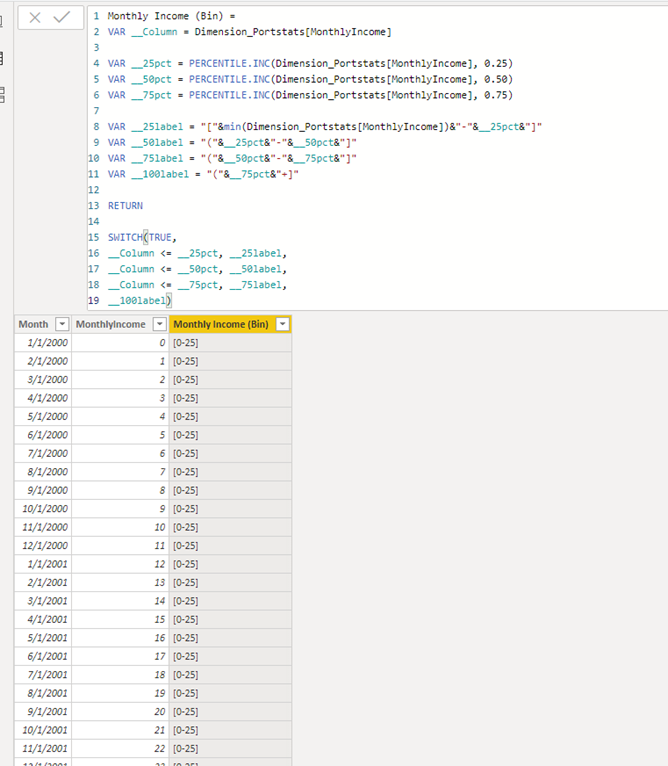
If it doesn’t meet your requirement, could you please show the exact expected result based on the table that we have shared?
Best regards,
Hi @rawiswarden ,
Sorry for that We cannot find an effective way to add variables with a column and use it the PERCENTILE.INC function.
But we can simplify the formula as following, If you want to create another measure such as yearly, just chang the Dimension_Portstats[MonthlyIncome] to the column in this formula.
Monthly Income (Bin) =
VAR __Column = Dimension_Portstats[MonthlyIncome]
VAR __25pct = PERCENTILE.INC(Dimension_Portstats[MonthlyIncome], 0.25)
VAR __50pct = PERCENTILE.INC(Dimension_Portstats[MonthlyIncome], 0.50)
VAR __75pct = PERCENTILE.INC(Dimension_Portstats[MonthlyIncome], 0.75)
VAR __25label = "["&min(Dimension_Portstats[MonthlyIncome])&"-"&__25pct&"]"
VAR __50label = "("&__25pct&"-"&__50pct&"]"
VAR __75label = "("&__50pct&"-"&__75pct&"]"
VAR __100label = "("&__75pct&"+]"
RETURN
SWITCH(TRUE,
__Column <= __25pct, __25label,
__Column <= __50pct, __50label,
__Column <= __75pct, __75label,
__100label)
If it doesn’t meet your requirement, could you please show the exact expected result based on the table that we have shared?
Best regards,
I'd prefer to only have to change the column in one place, but I'll take what I can get!
Check out the May 2026 Power BI update to learn about new features.
Sign up to receive a private message when registration opens and key events begin.
If you have recently started exploring Fabric, we'd love to hear how it's going. Your feedback can help with product improvements.
| User | Count |
|---|---|
| 32 | |
| 26 | |
| 25 | |
| 24 | |
| 15 |
| User | Count |
|---|---|
| 62 | |
| 48 | |
| 27 | |
| 21 | |
| 20 |