cancel
Showing results for 
Search instead for 
Did you mean: 

Did you hear? There's a new SQL AI Developer certification (DP-800). Start preparing now and be one of the first to get certified. Register now

Reply
Anonymous
Not applicable

Using Values from Previous Dates

I have an issue where I would like for a month to show the 67% of the company's value for 2 months ago plus 33% of the company's value for the previous month as I would like to try to compare the values to the current month's sales (could be in 2 different tables ). I added a column (Next month) that would project the next month out. I wrote the following code that I thought would accomplish this but I am getting odd results


Pushed Amount = 
var amount = Sheet2[Sale Amount]
var month1 = Sheet2[Next Date]
var month2 = PREVIOUSMONTH(Sheet2[Next Date])
var dealdate =Sheet2[Deal Date]
var saleamount = Sheet2[Sale Amount]
var company = Sheet2[Company]
var pushamount = 
iferror(CALCULATE(SUM(Sheet2[Sale Amount]), Sheet2[Deal Date] = month2,Sheet2[Company] = company),0)*.67 + iferror(CALCULATE(SUM(Sheet2[Sale Amount]), Sheet2[Deal Date] = month1, Sheet2[Company] = company),0)*.33

return
pushamount 

These are the results that I am getting: 
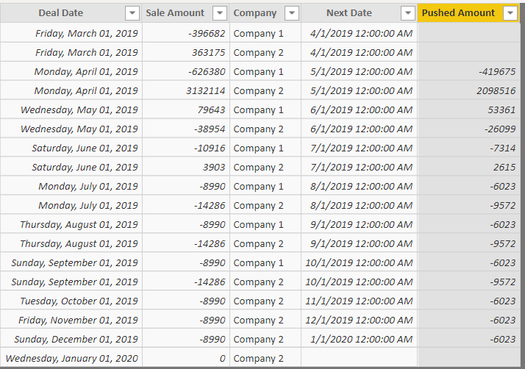
powerbi1.PNG


Should produce the same values as in the table below:
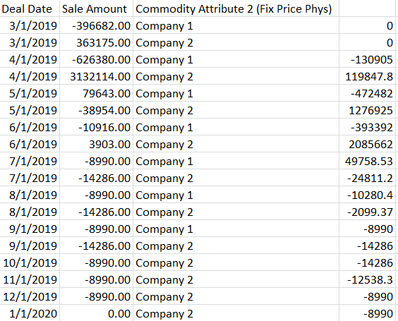
powerbi2.PNG

1 ACCEPTED SOLUTION
Anonymous
Not applicable

Solved this by creating a date table and a mesaure, code for the measure below


Measure = 
var month1 = CALCULATE(SUM(Sheet2[Sale Amount]),DATEADD('date'[Date],-1,MONTH))
var month2 = CALCULATE(SUM(Sheet2[Sale Amount]),DATEADD('date'[Date],-2,MONTH))
return
.33*month1+.67*month2

One thing that tripped me up was using the incorrect date column when creating visualizations. I was using the one in my original table when I should have been using the one from the date table. If you are getting the exact same number in the same month then this is likely why

View solution in original post

3 REPLIES 3
Ashish_Mathur
Super User
Super User

Hi,

Why do you want that result as a calculated column - why not a measure?  Share the link from where i can download the PBI file.


Regards,
Ashish Mathur
http://www.ashishmathur.com
https://www.linkedin.com/in/excelenthusiasts/
Anonymous
Not applicable

I'm open to using a measure instead, I'm not sure when to use one instead of another

Anonymous
Not applicable

Solved this by creating a date table and a mesaure, code for the measure below


Measure = 
var month1 = CALCULATE(SUM(Sheet2[Sale Amount]),DATEADD('date'[Date],-1,MONTH))
var month2 = CALCULATE(SUM(Sheet2[Sale Amount]),DATEADD('date'[Date],-2,MONTH))
return
.33*month1+.67*month2

One thing that tripped me up was using the incorrect date column when creating visualizations. I was using the one in my original table when I should have been using the one from the date table. If you are getting the exact same number in the same month then this is likely why

Helpful resources

Announcements
April Power BI Update Carousel

Power BI Monthly Update - April 2026

Check out the April 2026 Power BI update to learn about new features.

Fabric SQL PBI Data Days

Data Days 2026 coming soon!

Sign up to receive a private message when registration opens and key events begin.

New to Fabric survey Carousel

New to Fabric Survey

If you have recently started exploring Fabric, we'd love to hear how it's going. Your feedback can help with product improvements.

Power BI DataViz World Championships carousel

Power BI DataViz World Championships - June 2026

A new Power BI DataViz World Championship is coming this June! Don't miss out on submitting your entry.