Join us in Barcelona for FabCon and SQLCon, September 28 - October 1, 2026.
This is best Fabric, Power BI, SQL and AI community event. How do we know? The last event sold out! Save €200 with code FABCMTY200.
Register now- Power BI forums
- Get Help with Power BI
- Desktop
- Service
- Report Server
- Power Query
- Mobile Apps
- Developer
- DAX Commands and Tips
- Custom Visuals Development Discussion
- Health and Life Sciences
- Power BI Spanish forums
- Translated Spanish Desktop
- Training and Consulting
- Instructor Led Training
- Dashboard in a Day for Women, by Women
- Galleries
- Data Stories Gallery
- Themes Gallery
- Contests Gallery
- QuickViz Gallery
- Quick Measures Gallery
- Visual Calculations Gallery
- Fabric Apps Gallery
- Notebook Gallery
- Translytical Task Flow Gallery
- TMDL Gallery
- R Script Showcase
- Webinars and Video Gallery
- Ideas
- Custom Visuals Ideas (read-only)
- Issues
- Issues
- Events
- Upcoming Events
The Fabric community is upgrading! Read all of the details including the timeline and what you can expect. Learn more
- Power BI forums
- Forums
- Get Help with Power BI
- Desktop
- Re: Using Dynamic text Narratives
- Subscribe to RSS Feed
- Mark Topic as New
- Mark Topic as Read
- Float this Topic for Current User
- Bookmark
- Subscribe
- Printer Friendly Page


- Mark as New
- Bookmark
- Subscribe
- Mute
- Subscribe to RSS Feed
- Permalink
- Report Inappropriate Content
Using Dynamic text Narratives
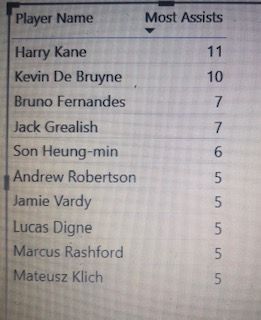
Hi All
Please see attached an excel report showing the premier league football players . I want to create a dynamic text narrative that tells me the player who has the most assist . e.g Harry Kane has the most assists of 11
The dynamic texts are underlined and in bold from example above (details below)
- Harry Kane
- Most Assists
- 11
How do I go about creating a dynamic text
Many thanks
Solved! Go to Solution.


- Mark as New
- Bookmark
- Subscribe
- Mute
- Subscribe to RSS Feed
- Permalink
- Report Inappropriate Content
Hi @atin
Download this PBIX with sample data and working code/visual
Try this Measure instead
Player With Most Assists =

CALCULATE( MAX('Table'[Player Name]), TOPN(1, ALL('Table'))) & " has the most assists of "  & CALCULATE( MAX('Table'[Most Assists]), TOPN(1, ALL('Table')))
Regards
Phil
Did I answer your question? Then please mark my post as the solution.
If I helped you, click on the Thumbs Up to give Kudos.
Blog :: YouTube Channel :: Connect on Linkedin
Proud to be a Super User!
- Mark as New
- Bookmark
- Subscribe
- Mute
- Subscribe to RSS Feed
- Permalink
- Report Inappropriate Content
Many thanks for the solution. I have one further question relating to this example
If I want to include the team Harry Kane plays for, how do I do this. One of the columns in the data set has the TEAMS included.
I want my narrative to say Harry Kane plays for Tottenham and has the most assists of 11
Many thanks
- Mark as New
- Bookmark
- Subscribe
- Mute
- Subscribe to RSS Feed
- Permalink
- Report Inappropriate Content
Hi @atin
Download this sample PBIX file
If your table looks like this

then use this measure
Player With Most Assists =

CALCULATE( MAX('Table'[Player Name]), TOPN(1, ALL('Table'))) & " plays for " & CALCULATE( MAX('Table'[Teams]), TOPN(1, ALL('Table'))) & " and has the most assists of "  & CALCULATE( MAX('Table'[Most Assists]), TOPN(1, ALL('Table')))
to give this result

Regards
Phil
Did I answer your question? Then please mark my post as the solution.
If I helped you, click on the Thumbs Up to give Kudos.
Blog :: YouTube Channel :: Connect on Linkedin
Proud to be a Super User!
- Mark as New
- Bookmark
- Subscribe
- Mute
- Subscribe to RSS Feed
- Permalink
- Report Inappropriate Content
Hi @atin
Download this PBIX with sample data and working code/visual
Try this Measure instead
Player With Most Assists =

CALCULATE( MAX('Table'[Player Name]), TOPN(1, ALL('Table'))) & " has the most assists of "  & CALCULATE( MAX('Table'[Most Assists]), TOPN(1, ALL('Table')))
Regards
Phil
Did I answer your question? Then please mark my post as the solution.
If I helped you, click on the Thumbs Up to give Kudos.
Blog :: YouTube Channel :: Connect on Linkedin
Proud to be a Super User!
- Mark as New
- Bookmark
- Subscribe
- Mute
- Subscribe to RSS Feed
- Permalink
- Report Inappropriate Content
Many thanks for the solution. I have one further question relating to this example
If I want to include the team Harry Kane plays for, how do I do this. One of the columns in the data set has the TEAMS included.
I want my narrative to say Harry Kane plays for Tottenham and has the most assists of 11
Many thanks
- Mark as New
- Bookmark
- Subscribe
- Mute
- Subscribe to RSS Feed
- Permalink
- Report Inappropriate Content
Hi @atin
Download this sample PBIX file
If your table looks like this
then use this measure
Player With Most Assists =

CALCULATE( MAX('Table'[Player Name]), TOPN(1, ALL('Table'))) & " plays for " & CALCULATE( MAX('Table'[Teams]), TOPN(1, ALL('Table'))) & " and has the most assists of "  & CALCULATE( MAX('Table'[Most Assists]), TOPN(1, ALL('Table')))
to give this result
Regards
Phil
Did I answer your question? Then please mark my post as the solution.
If I helped you, click on the Thumbs Up to give Kudos.
Blog :: YouTube Channel :: Connect on Linkedin
Proud to be a Super User!
- Mark as New
- Bookmark
- Subscribe
- Mute
- Subscribe to RSS Feed
- Permalink
- Report Inappropriate Content
Hi @PhilipTreacy - Many thanks for the solution provided above.
I have another question relating to the solution and example used in the sample pbix file above Where 2 players have the same number of most assists eg Kevin De Bruyne (Man City) & Harry Kane(Tottenham) both have 11.
How do I create a narrative which says
Kevin De Bruyne, Man City player and Harry Kane, Tottenham player have the most assists of 11
Many thanks
- Mark as New
- Bookmark
- Subscribe
- Mute
- Subscribe to RSS Feed
- Permalink
- Report Inappropriate Content
Hi @amitchandak Many thanks for responding back. There appears to be an error when creating the measure. The error says:
The expression refers to multiple columns. Multiple columns cannot be converted to a scalar value.
See measure below:
Player with Most Assists =
VALUES('Table A'[Player Name]) ))

- Mark as New
- Bookmark
- Subscribe
- Mute
- Subscribe to RSS Feed
- Permalink
- Report Inappropriate Content
@atin , a new measure like
meausre =
CALCULATE(Max(Table[player name]),TOPN(1,all(Table[Player Name]),[all Assists],DESC),VALUES(Table[Player Name]))
& " Most assists "
&
CALCULATE([all Assists],TOPN(1,all(Table[Player Name]),[all Assists],DESC),VALUES(Table[Player Name]))

Helpful resources

FabCon & SQLCon – Barcelona 2026
Join us in Barcelona for FabCon and SQLCon, the Fabric, Power BI, SQL, and AI community event. Save €200 with code FABCMTY200.

Power BI DataViz World Championships - June 2026
A new Power BI DataViz World Championship is coming this June! Don't miss out on submitting your entry.

| User | Count |
|---|---|
| 24 | |
| 22 | |
| 20 | |
| 18 | |
| 14 |


| User | Count |
|---|---|
| 31 | |
| 26 | |
| 23 | |
| 20 | |
| 20 |


