Join us in Barcelona for FabCon and SQLCon, September 28 - October 1, 2026.
This is best Fabric, Power BI, SQL and AI community event. How do we know? The last event sold out! Save €200 with code FABCMTY200.
Register now- Power BI forums
- Get Help with Power BI
- Desktop
- Service
- Report Server
- Power Query
- Mobile Apps
- Developer
- DAX Commands and Tips
- Custom Visuals Development Discussion
- Health and Life Sciences
- Power BI Spanish forums
- Translated Spanish Desktop
- Training and Consulting
- Instructor Led Training
- Dashboard in a Day for Women, by Women
- Galleries
- Data Stories Gallery
- Themes Gallery
- Contests Gallery
- QuickViz Gallery
- Quick Measures Gallery
- Visual Calculations Gallery
- Fabric Apps Gallery
- Notebook Gallery
- Translytical Task Flow Gallery
- TMDL Gallery
- R Script Showcase
- Webinars and Video Gallery
- Ideas
- Custom Visuals Ideas (read-only)
- Issues
- Issues
- Events
- Upcoming Events
The Fabric community is now in read-only for platform upgrade. Learn more
- Power BI forums
- Forums
- Get Help with Power BI
- Desktop
- Re: Using Dateadd
- Subscribe to RSS Feed
- Mark Topic as New
- Mark Topic as Read
- Float this Topic for Current User
- Bookmark
- Subscribe
- Printer Friendly Page

- Mark as New
- Bookmark
- Subscribe
- Mute
- Subscribe to RSS Feed
- Permalink
- Report Inappropriate Content
Using Dateadd
Hi,
I can t use the DATEADD function correctly.
DATEADD(HISTORIQUE[DateFinPeriodeEssai1],-nbjprevenance,DAY)
-nbjprevenance = variable
if I put 0 in place of the variable, I get the right dates. But as soon as I want to add or subtract, nothing goes, sometimes I have the right answer, sometimes nothing.
Thank you for your help
Solved! Go to Solution.
- Mark as New
- Bookmark
- Subscribe
- Mute
- Subscribe to RSS Feed
- Permalink
- Report Inappropriate Content
Hi,
After many tests, I tried this syntax:
HISTORIQUE[DateFinPeriodeEssai1] - nbjprevenance
and it works.


- Mark as New
- Bookmark
- Subscribe
- Mute
- Subscribe to RSS Feed
- Permalink
- Report Inappropriate Content
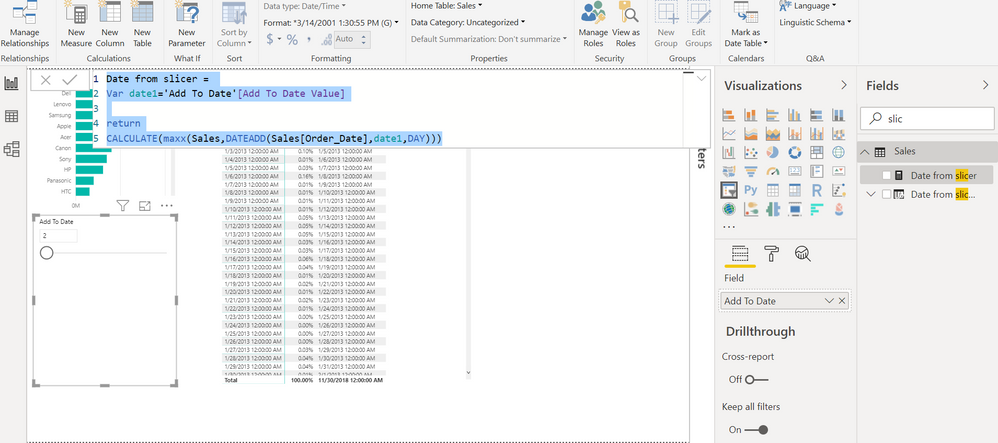
In case you plan to use a slicer, you can have a measure. Here "Add to date" is a slicer
Date from slicer =
Var date1='Add To Date'[Add To Date Value]

return
CALCULATE(maxx(Sales,DATEADD(Sales[Order_Date],date1,DAY)))
You want to add static value once as column
Date from slicer col =
Var date1=1

return
DATEADD(Sales[Order_Date],-1*date1,DAY)
- Mark as New
- Bookmark
- Subscribe
- Mute
- Subscribe to RSS Feed
- Permalink
- Report Inappropriate Content
Hi, I understand your solution, but it doesn't work for all my data

- Mark as New
- Bookmark
- Subscribe
- Mute
- Subscribe to RSS Feed
- Permalink
- Report Inappropriate Content
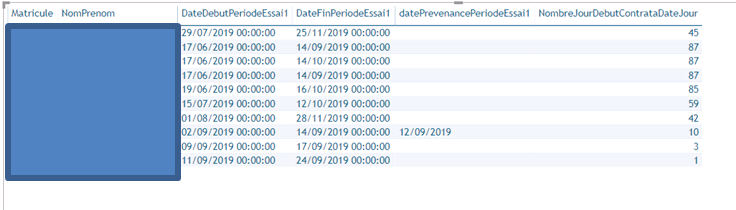
@PatriceGRENcan you provide details on how you are calculating nbjprevenance variable? Also do you have date dimension in your model on which you are performing this DateADD function?
Subscribe to the @PowerBIHowTo YT channel for an upcoming video on List and Record functions in Power Query!!
Learn Power BI and Fabric - subscribe to our YT channel - Click here: @PowerBIHowTo
If my solution proved useful, I'd be delighted to receive Kudos. When you put effort into asking a question, it's equally thoughtful to acknowledge and give Kudos to the individual who helped you solve the problem. It's a small gesture that shows appreciation and encouragement! ❤
Did I answer your question? Mark my post as a solution. Proud to be a Super User! Appreciate your Kudos 🙂
Feel free to email me with any of your BI needs.
- Mark as New
- Bookmark
- Subscribe
- Mute
- Subscribe to RSS Feed
- Permalink
- Report Inappropriate Content
- Mark as New
- Bookmark
- Subscribe
- Mute
- Subscribe to RSS Feed
- Permalink
- Report Inappropriate Content
Hi,
After many tests, I tried this syntax:
HISTORIQUE[DateFinPeriodeEssai1] - nbjprevenance
and it works.
- Mark as New
- Bookmark
- Subscribe
- Mute
- Subscribe to RSS Feed
- Permalink
- Report Inappropriate Content
Hi,
datePrevenancePeriodeEssai1 =
var nbj = HISTORIQUE[NombreJourDebutContrataDateJour]
var nbjprevenance =
switch(TRUE(); -- donne le nombre de jours de prévenance à respecter
nbj <8 ; 1;
and(nbj > 8 ; nbj <= 30);2;
and(nbj >30 ; nbj <= 90);15;30 )
return
DATEADD(HISTORIQUE[DateFinPeriodeEssai1];-nbjprevenance;DAY)
for the "Date Dimension", I'll look. This is a model that is available to me, I don't know yet everything in it.

Helpful resources

FabCon & SQLCon – Barcelona 2026
Join us in Barcelona for FabCon and SQLCon, the Fabric, Power BI, SQL, and AI community event. Save €200 with code FABCMTY200.

Power BI DataViz World Championships - June 2026
A new Power BI DataViz World Championship is coming this June! Don't miss out on submitting your entry.

| User | Count |
|---|---|
| 23 | |
| 22 | |
| 14 | |
| 14 | |
| 13 |


| User | Count |
|---|---|
| 47 | |
| 39 | |
| 24 | |
| 22 | |
| 20 |


