This time we’re going bigger than ever. Fabric, Power BI, SQL, AI and more. We're covering it all. You won't want to miss it.
Learn moreDid you hear? There's a new SQL AI Developer certification (DP-800). Start preparing now and be one of the first to get certified. Register now
Hi,
I can t use the DATEADD function correctly.
DATEADD(HISTORIQUE[DateFinPeriodeEssai1],-nbjprevenance,DAY)
-nbjprevenance = variable
if I put 0 in place of the variable, I get the right dates. But as soon as I want to add or subtract, nothing goes, sometimes I have the right answer, sometimes nothing.
Thank you for your help
Solved! Go to Solution.
Hi,
After many tests, I tried this syntax:
HISTORIQUE[DateFinPeriodeEssai1] - nbjprevenance
and it works.
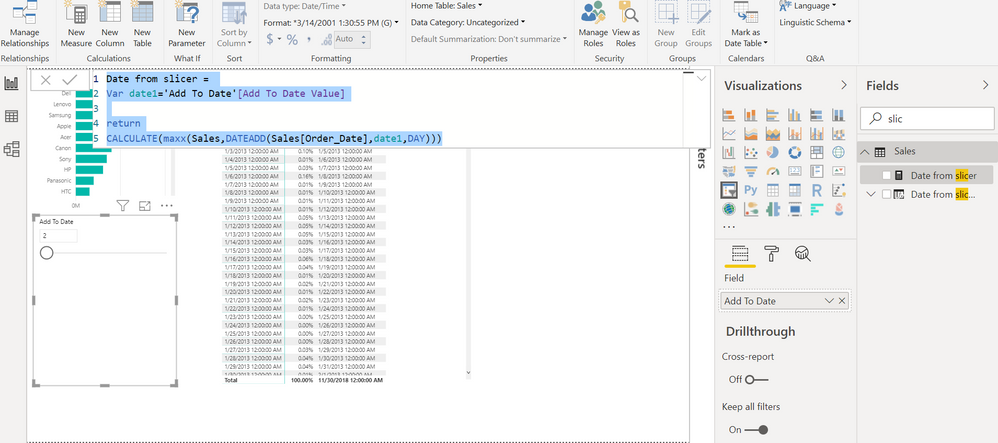
In case you plan to use a slicer, you can have a measure. Here "Add to date" is a slicer
Date from slicer = Var date1='Add To Date'[Add To Date Value] return CALCULATE(maxx(Sales,DATEADD(Sales[Order_Date],date1,DAY)))
You want to add static value once as column
Date from slicer col = Var date1=1 return DATEADD(Sales[Order_Date],-1*date1,DAY)
Hi, I understand your solution, but it doesn't work for all my data
@PatriceGRENcan you provide details on how you are calculating nbjprevenance variable? Also do you have date dimension in your model on which you are performing this DateADD function?
Subscribe to the @PowerBIHowTo YT channel for an upcoming video on List and Record functions in Power Query!!
Learn Power BI and Fabric - subscribe to our YT channel - Click here: @PowerBIHowTo
If my solution proved useful, I'd be delighted to receive Kudos. When you put effort into asking a question, it's equally thoughtful to acknowledge and give Kudos to the individual who helped you solve the problem. It's a small gesture that shows appreciation and encouragement! ❤
Did I answer your question? Mark my post as a solution. Proud to be a Super User! Appreciate your Kudos 🙂
Feel free to email me with any of your BI needs.
Hi,
After many tests, I tried this syntax:
HISTORIQUE[DateFinPeriodeEssai1] - nbjprevenance
and it works.
Hi,
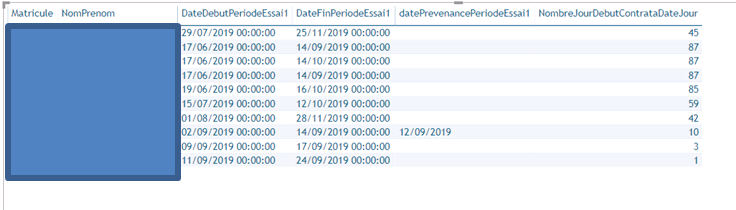
datePrevenancePeriodeEssai1 =
var nbj = HISTORIQUE[NombreJourDebutContrataDateJour]
var nbjprevenance =
switch(TRUE(); -- donne le nombre de jours de prévenance à respecter
nbj <8 ; 1;
and(nbj > 8 ; nbj <= 30);2;
and(nbj >30 ; nbj <= 90);15;30 )
return
DATEADD(HISTORIQUE[DateFinPeriodeEssai1];-nbjprevenance;DAY)
for the "Date Dimension", I'll look. This is a model that is available to me, I don't know yet everything in it.
Check out the April 2026 Power BI update to learn about new features.
If you have recently started exploring Fabric, we'd love to hear how it's going. Your feedback can help with product improvements.
| User | Count |
|---|---|
| 37 | |
| 37 | |
| 31 | |
| 21 | |
| 16 |
| User | Count |
|---|---|
| 66 | |
| 56 | |
| 31 | |
| 26 | |
| 23 |