cancel
Showing results for 
Search instead for 
Did you mean: 

July 7 - July 17 | Round 2 of the Power BI Dataviz World Championships. Don't miss your chance! Learn more

Reply
Boycie92
Resolver I
Resolver I

Using Date Tables

Hi,

I’m wondering if someone can help.


I have created a date table but the problem is I have other tables and each of them have different date columns (for different functions).


How do I connect it to my model and how can I ensure that all of the date columns can reference it?


Thanks,

Boycie92

1 ACCEPTED SOLUTION

Hi @Boycie92,

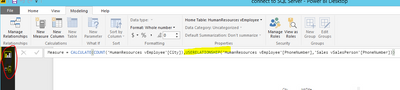
As I tested, the USERELATIONSHIP function work correctly in Direct Query mode as follows.

1.PNG

>>If I wanted to use the QuaterYear column I have in my DateTable instead of date column I have in one of the other tables (for a chart or calculation) that has an inactive relationship how would I achieve this?

As what @jthomson said, you need to use USERELATIONSHIP in your measures to active the inactive relationship. Prerequisite, at least one of the column has unique value so that they can be used to create relationship.

Best Regards,
Angelia

View solution in original post

5 REPLIES 5
jthomson
Solution Sage
Solution Sage

You can connect tables through more than one column the same way you'd have just a single relationship, you just need to pick one to be the active relationship (normally the most important or one you use most often), and the others are inactive and you need to use USERELATIONSHIP in your measures etc where applicable

HI @jthomson


Thanks for the quick reply.


Just a couple of further questions to clarify


Can the USERELATIONSHIP function work with Direct Query?


If I wanted to use the QuaterYear column I have in my DateTable instead of date column I have in one of the other tables (for a chart or calculation) that has an inactive relationship how would I achieve this?


Thanks,

Boycie92

Hi @Boycie92,

As I tested, the USERELATIONSHIP function work correctly in Direct Query mode as follows.

1.PNG

>>If I wanted to use the QuaterYear column I have in my DateTable instead of date column I have in one of the other tables (for a chart or calculation) that has an inactive relationship how would I achieve this?

As what @jthomson said, you need to use USERELATIONSHIP in your measures to active the inactive relationship. Prerequisite, at least one of the column has unique value so that they can be used to create relationship.

Best Regards,
Angelia

Hi @v-huizhn-msft


So the only way to use a column within my date table that has an inactive relationship is to create a measure?


I can’t just place the column in a visual and use a measure I have already created? What if I wanted to use a DateTable column as a Filter? Would all of my surrounding visuals need to work based on a USERELATIONSHIP measure?


Thanks,

Boycie92

I don't use Direct Query so don't know how this would work in your case

Helpful resources

Announcements
FabCon and SQLCon Barcelona 2026

FabCon & SQLCon – Barcelona 2026

Join us in Barcelona for FabCon and SQLCon, the Fabric, Power BI, SQL, and AI community event. Save €200 with code FABCMTY200.

60 days of Data Days Carousel

Data Days 2026

Join Fabric Data Days 2026: 60 days of free live/on-demand sessions, challenges, study groups, and certification opportunities.

Power BI DataViz World Championships carousel

Power BI DataViz World Championships - June 2026

A new Power BI DataViz World Championship is coming this June! Don't miss out on submitting your entry.