Join us at FabCon Atlanta from March 16 - 20, 2026, for the ultimate Fabric, Power BI, AI and SQL community-led event. Save $200 with code FABCOMM.
Register now!The Power BI Data Visualization World Championships is back! It's time to submit your entry. Live now!
Hi all,
I need help in writing this code in Query Editor.
I have created column in data section with below mentioned code:
MAX_ICE_ID = CALCULATE(MAX(TransactionDataTrackerHK021908[ICERecordID(ReadyPublish)]),FILTER(TransactionDataTrackerHK021908,TransactionDataTrackerHK021908[OriginalICERecordID(ReadyPublish)]=EARLIER(TransactionDataTrackerHK021908[ICERecordID(ReadyPublish)])))
However, I need the same logic in query editor, but above doesnt work in it.
Thank you
Abhijit
Solved! Go to Solution.
Hi @Anonymous,
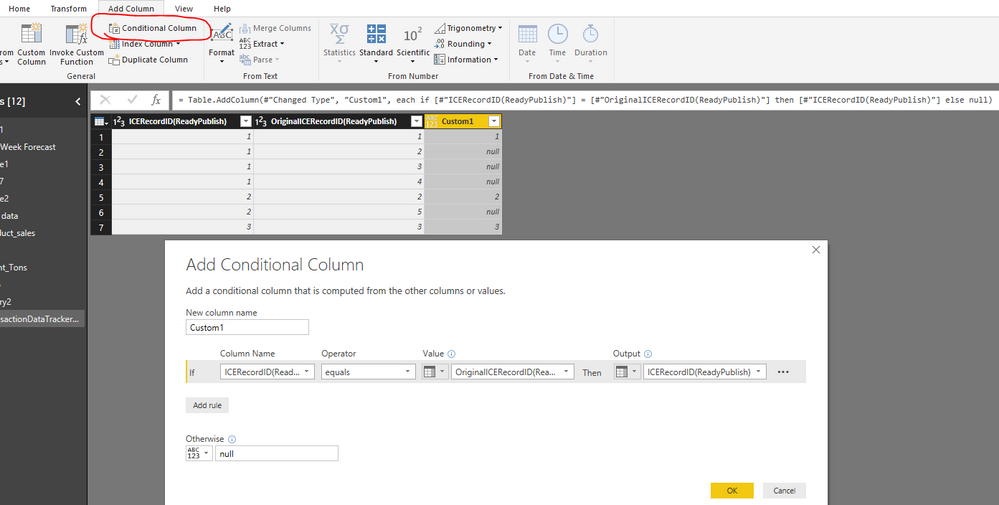
You can add a conditional column in Query Editor.
Power Query:
#"Added Conditional Column" = Table.AddColumn(#"PreviousStep", "Custom1", each if [#"ICERecordID(ReadyPublish)"] = [#"OriginalICERecordID(ReadyPublish)"] then [#"ICERecordID(ReadyPublish)"] else null)
Best regards,
Yuliana Gu
Hi @Anonymous,
You can add a conditional column in Query Editor.
Power Query:
#"Added Conditional Column" = Table.AddColumn(#"PreviousStep", "Custom1", each if [#"ICERecordID(ReadyPublish)"] = [#"OriginalICERecordID(ReadyPublish)"] then [#"ICERecordID(ReadyPublish)"] else null)
Best regards,
Yuliana Gu
Hello @Anonymous,
You need to use M Query Language in Advance Editor.
The Power BI Data Visualization World Championships is back! It's time to submit your entry.
Check out the January 2026 Power BI update to learn about new features.
| User | Count |
|---|---|
| 61 | |
| 49 | |
| 30 | |
| 25 | |
| 23 |
| User | Count |
|---|---|
| 128 | |
| 102 | |
| 56 | |
| 39 | |
| 31 |