Share feedback directly with Fabric product managers, participate in targeted research studies and influence the Fabric roadmap.
Sign up nowGet Fabric certified for FREE! Don't miss your chance! Learn more
Hi all,
I need help in writing this code in Query Editor.
I have created column in data section with below mentioned code:
MAX_ICE_ID = CALCULATE(MAX(TransactionDataTrackerHK021908[ICERecordID(ReadyPublish)]),FILTER(TransactionDataTrackerHK021908,TransactionDataTrackerHK021908[OriginalICERecordID(ReadyPublish)]=EARLIER(TransactionDataTrackerHK021908[ICERecordID(ReadyPublish)])))
However, I need the same logic in query editor, but above doesnt work in it.
Thank you
Abhijit
Solved! Go to Solution.
Hi @Anonymous,
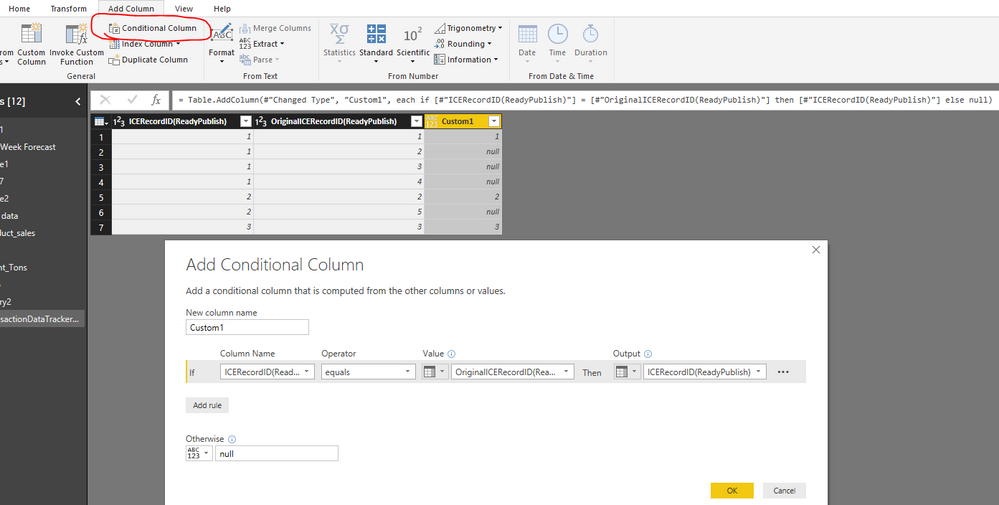
You can add a conditional column in Query Editor.
Power Query:
#"Added Conditional Column" = Table.AddColumn(#"PreviousStep", "Custom1", each if [#"ICERecordID(ReadyPublish)"] = [#"OriginalICERecordID(ReadyPublish)"] then [#"ICERecordID(ReadyPublish)"] else null)
Best regards,
Yuliana Gu
Hi @Anonymous,
You can add a conditional column in Query Editor.
Power Query:
#"Added Conditional Column" = Table.AddColumn(#"PreviousStep", "Custom1", each if [#"ICERecordID(ReadyPublish)"] = [#"OriginalICERecordID(ReadyPublish)"] then [#"ICERecordID(ReadyPublish)"] else null)
Best regards,
Yuliana Gu
Hello @Anonymous,
You need to use M Query Language in Advance Editor.
If you love stickers, then you will definitely want to check out our Community Sticker Challenge!
Check out the January 2026 Power BI update to learn about new features.
| User | Count |
|---|---|
| 61 | |
| 58 | |
| 45 | |
| 21 | |
| 18 |
| User | Count |
|---|---|
| 122 | |
| 119 | |
| 37 | |
| 35 | |
| 29 |