Join us at FabCon Atlanta from March 16 - 20, 2026, for the ultimate Fabric, Power BI, AI and SQL community-led event. Save $200 with code FABCOMM.
Register now!The Power BI Data Visualization World Championships is back! Get ahead of the game and start preparing now! Learn more
Hi all,
I need help in writing this code in Query Editor.
I have created column in data section with below mentioned code:
MAX_ICE_ID = CALCULATE(MAX(TransactionDataTrackerHK021908[ICERecordID(ReadyPublish)]),FILTER(TransactionDataTrackerHK021908,TransactionDataTrackerHK021908[OriginalICERecordID(ReadyPublish)]=EARLIER(TransactionDataTrackerHK021908[ICERecordID(ReadyPublish)])))
However, I need the same logic in query editor, but above doesnt work in it.
Thank you
Abhijit
Solved! Go to Solution.
Hi @Anonymous,
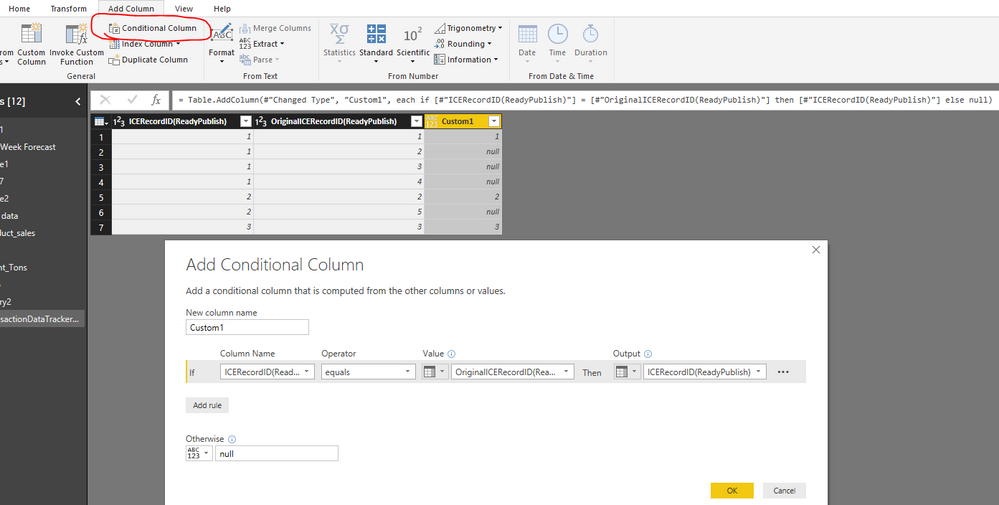
You can add a conditional column in Query Editor.
Power Query:
#"Added Conditional Column" = Table.AddColumn(#"PreviousStep", "Custom1", each if [#"ICERecordID(ReadyPublish)"] = [#"OriginalICERecordID(ReadyPublish)"] then [#"ICERecordID(ReadyPublish)"] else null)
Best regards,
Yuliana Gu
Hi @Anonymous,
You can add a conditional column in Query Editor.
Power Query:
#"Added Conditional Column" = Table.AddColumn(#"PreviousStep", "Custom1", each if [#"ICERecordID(ReadyPublish)"] = [#"OriginalICERecordID(ReadyPublish)"] then [#"ICERecordID(ReadyPublish)"] else null)
Best regards,
Yuliana Gu
Hello @Anonymous,
You need to use M Query Language in Advance Editor.
The Power BI Data Visualization World Championships is back! Get ahead of the game and start preparing now!
| User | Count |
|---|---|
| 61 | |
| 43 | |
| 40 | |
| 38 | |
| 22 |
| User | Count |
|---|---|
| 178 | |
| 125 | |
| 116 | |
| 77 | |
| 54 |