Join us at FabCon Atlanta from March 16 - 20, 2026, for the ultimate Fabric, Power BI, AI and SQL community-led event. Save $200 with code FABCOMM.
Register now!The Power BI Data Visualization World Championships is back! Get ahead of the game and start preparing now! Learn more
Hello Power BI super heroes!
I'd like to use 'Retail Excess' measure as a legend for a chart, but having trouble with it. May I know how I can make it?
I tried to find solutions from articles in ommunity, but couldn't.
Measures
Solved! Go to Solution.
First, measure can be affected by filter/slicer, so you can use it to get dynamic summary result in a visual by its row context. So you could not put it into Legend of a visual.
https://www.sqlbi.com/articles/calculated-columns-and-measures-in-dax/
Second, for your case, you could this way as below:
Step1:
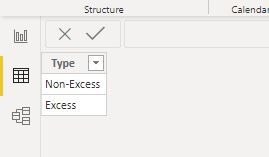
You need a table that contains all the result of this measure, for example:
Step2:
Create a measure like this logic:
Measure 3 = var _table=FILTER(CROSSJOIN(ADDCOLUMNS('Fact',"_type",[Measure]),'Type'),[_type]=[Type]) return
COUNTROWS(_table)
You could also use SUMX/MAXX/MINX instead of COUNTROWS in the formula
Result:
here is sample pbix file, please try it.
Regards,
Lin
HI @Junminkim0214 ,
You can never use a MEASURE as a legend in the charts. They have to be always COLUMNS.
Convert your measure as a calculated column, then use it as a legend in your chart.
Thanks,
Pragati
Hi @Pragati11
Thanks for your advice!
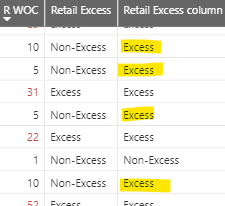
I created a column like below, but the results are not correct. May I know a reason for this?
Column
Retail Excess column = if([Retail WOC]>=12,"Excess","Non-Excess")
Measure
Retail Excess = if([Retail WOC]>=12,"Excess","Non-Excess")
Best regards,
Jun
First, measure can be affected by filter/slicer, so you can use it to get dynamic summary result in a visual by its row context. So you could not put it into Legend of a visual.
https://www.sqlbi.com/articles/calculated-columns-and-measures-in-dax/
Second, for your case, you could this way as below:
Step1:
You need a table that contains all the result of this measure, for example:
Step2:
Create a measure like this logic:
Measure 3 = var _table=FILTER(CROSSJOIN(ADDCOLUMNS('Fact',"_type",[Measure]),'Type'),[_type]=[Type]) return
COUNTROWS(_table)
You could also use SUMX/MAXX/MINX instead of COUNTROWS in the formula
Result:
here is sample pbix file, please try it.
Regards,
Lin
Hi @Junminkim0214 ,
How is your following measure caluclated?
Retail WOC = [CY RCS (qty)]/[Avg CS Last 4 Weeks]
It uses 2 more measures, how are they calculated?
Thanks,
Pragati
The Power BI Data Visualization World Championships is back! Get ahead of the game and start preparing now!
Check out the November 2025 Power BI update to learn about new features.
| User | Count |
|---|---|
| 59 | |
| 46 | |
| 42 | |
| 23 | |
| 17 |
| User | Count |
|---|---|
| 190 | |
| 122 | |
| 96 | |
| 66 | |
| 47 |