cancel
Showing results for 
Search instead for 
Did you mean: 

Get Fabric Certified for FREE during Fabric Data Days. Don't miss your chance! Request now

Reply
Glo_Loaisiga86
Frequent Visitor

Unpivot but show more than one row in the matrix

Hi all,

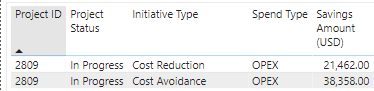
I'm building a power bi dashboard where the users can select the columns that they want to see in the table. The dashboard will be used by the users to download their savings projects report. A single project can contain 2 different project types (Cost Avoidance and Cost Reduction). Hence, in the original report, I have two rows, one showing the savings under Cost Avoidance and one showing the savings for Cost Reduction.

Glo_Loaisiga86_0-1685410148093.png


I made a unpivot and created a matrix, however, when filtering by the project ID, it is showing me only one row with the first value (saving amount for cost avoidance) or with the last value (saving amount for cost reduction).

Is it a way to show the 2 rows in the matrix after unpivoting?

Glo_Loaisiga86_1-1685410403161.png


1 ACCEPTED SOLUTION
Ritaf1983
Super User
Super User

Hi @Glo_Loaisiga86 

A matrix is a table that aggregates data.
Similar to pivots in Excel.
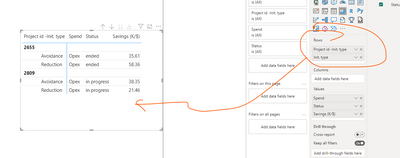
Therefore, if there is a "split" data, the hierarchy is the only way to display all its layers.

Ritaf1983_0-1685413752013.png


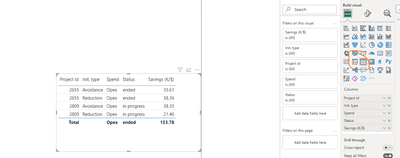
Otherwise, a flat table may be used.

Ritaf1983_1-1685413798531.png

Link to the sample file 

If this post helps, then please consider Accepting it as the solution to help the other members find it more quickly.


Regards,
Rita Fainshtein | Microsoft MVP
https://www.linkedin.com/in/rita-fainshtein/
Blog : https://www.madeiradata.com/profile/ritaf/profile

View solution in original post

3 REPLIES 3
Ritaf1983
Super User
Super User

Hi @Glo_Loaisiga86 

A matrix is a table that aggregates data.
Similar to pivots in Excel.
Therefore, if there is a "split" data, the hierarchy is the only way to display all its layers.

Ritaf1983_0-1685413752013.png


Otherwise, a flat table may be used.

Ritaf1983_1-1685413798531.png

Link to the sample file 

If this post helps, then please consider Accepting it as the solution to help the other members find it more quickly.


Regards,
Rita Fainshtein | Microsoft MVP
https://www.linkedin.com/in/rita-fainshtein/
Blog : https://www.madeiradata.com/profile/ritaf/profile

Thanks @Ritaf1983 

I was glad to help 🙂

Regards,
Rita Fainshtein | Microsoft MVP
https://www.linkedin.com/in/rita-fainshtein/
Blog : https://www.madeiradata.com/profile/ritaf/profile

Helpful resources

Announcements
November Power BI Update Carousel

Power BI Monthly Update - November 2025

Check out the November 2025 Power BI update to learn about new features.

Fabric Data Days Carousel

Fabric Data Days

Advance your Data & AI career with 50 days of live learning, contests, hands-on challenges, study groups & certifications and more!

FabCon Atlanta 2026 carousel

FabCon Atlanta 2026

Join us at FabCon Atlanta, March 16-20, for the ultimate Fabric, Power BI, AI and SQL community-led event. Save $200 with code FABCOMM.

Top Solution Authors
Top Kudoed Authors