Don't miss your chance to take the Fabric Data Engineer (DP-600) exam for FREE! Find out how by attending the DP-600 session on April 23rd (pacific time), live or on-demand.
Learn moreNext up in the FabCon + SQLCon recap series: The roadmap for Microsoft SQL and Maximizing Developer experiences in Fabric. All sessions are available on-demand after the live show. Register now
Hi all..
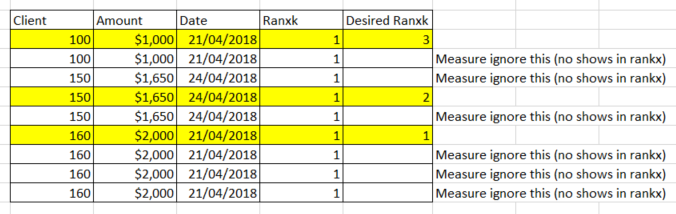
I need your help, i have this table:
Only show 1 client, no repeat the rankx.
Thx so much for ur help.
Hi,
Are you looking at writing a calculated column formula or a measure? Also, there are 3 rows for 150, 1650 and 24/4/2018. Why have you show the rank for the seond row (why not for the first and third row)?
Sorry i have a mistake...
is a calculated column...
Hi,
Why do you want it as a calculated column and not as a measure? The problem with a calculated column is that the calculation does not refresh when a filter/slicer selection is made in any visual.
Hi.
the final result will be shown in a table visual, with more fields. So I do not know what would be the correct form if column or measure .. And slicers too..
Hi,
It should defeinnitely be a measure. Download the file from here.
Hope this helps.
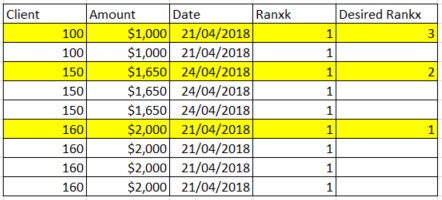
@Ashish_Mathur Thx for ur help, the measure works fine, but when i add more fields in visual, the rankx no works fine... can u help me plz (i want to add 7 columns in mi visual..)
for example:
Thx so much for u help
Hi,
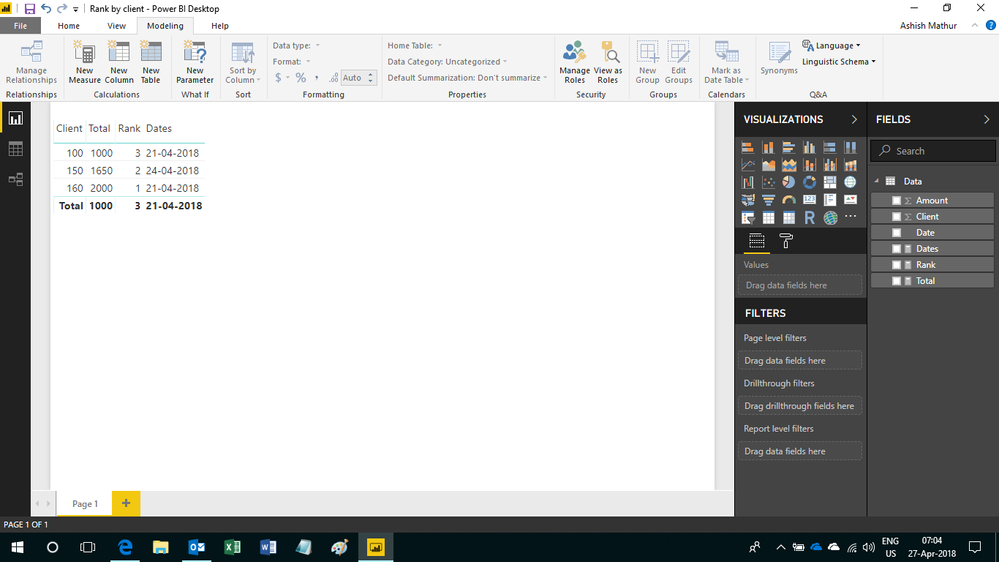
If you wish to show date also in the visual, then add this measure
Dates = MIN(Data[Date])
Here is the visual
If you have recently started exploring Fabric, we'd love to hear how it's going. Your feedback can help with product improvements.
A new Power BI DataViz World Championship is coming this June! Don't miss out on submitting your entry.
| User | Count |
|---|---|
| 46 | |
| 43 | |
| 39 | |
| 19 | |
| 15 |
| User | Count |
|---|---|
| 68 | |
| 65 | |
| 31 | |
| 28 | |
| 24 |