This is best Fabric, Power BI, SQL and AI community event. How do we know? The last event sold out! Save €200 with code FABCMTY200.
Register nowA new Data Days event is coming soon! This time we’re going bigger than ever. Fabric, Power BI, SQL, AI and more. Don't miss out.
Hi all..
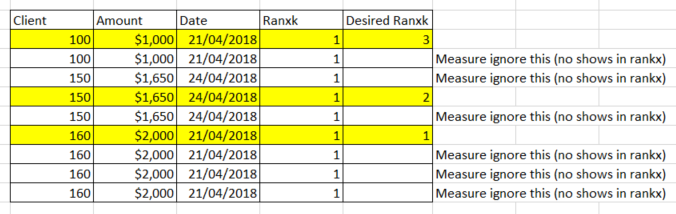
I need your help, i have this table:
Only show 1 client, no repeat the rankx.
Thx so much for ur help.
Hi,
Are you looking at writing a calculated column formula or a measure? Also, there are 3 rows for 150, 1650 and 24/4/2018. Why have you show the rank for the seond row (why not for the first and third row)?
Sorry i have a mistake...
is a calculated column...
Hi,
Why do you want it as a calculated column and not as a measure? The problem with a calculated column is that the calculation does not refresh when a filter/slicer selection is made in any visual.
Hi.
the final result will be shown in a table visual, with more fields. So I do not know what would be the correct form if column or measure .. And slicers too..
Hi,
It should defeinnitely be a measure. Download the file from here.
Hope this helps.
@Ashish_Mathur Thx for ur help, the measure works fine, but when i add more fields in visual, the rankx no works fine... can u help me plz (i want to add 7 columns in mi visual..)
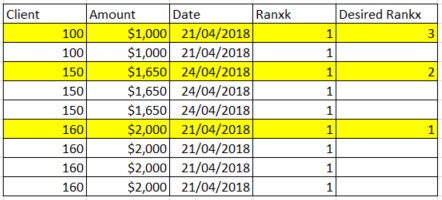
for example:
Thx so much for u help
Hi,
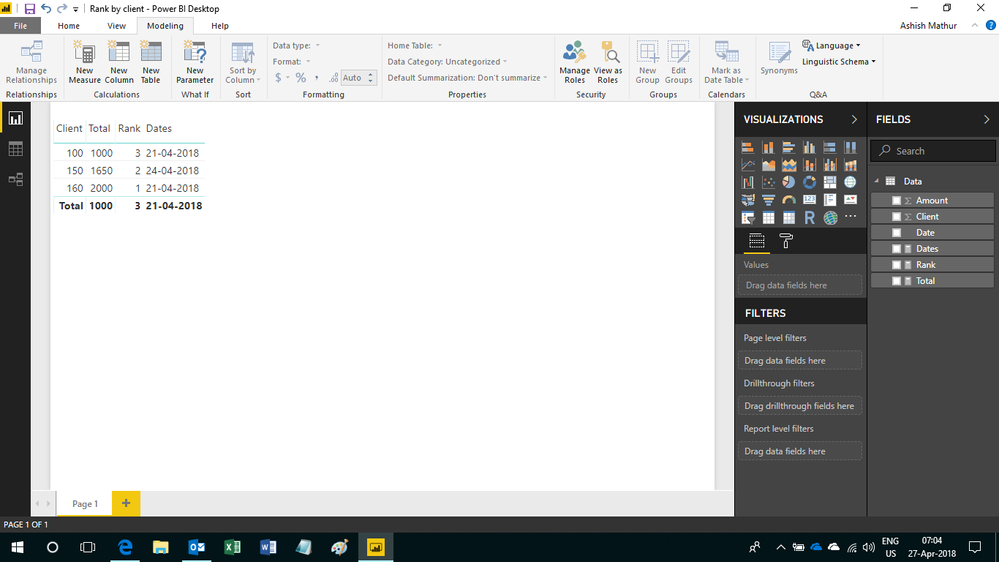
If you wish to show date also in the visual, then add this measure
Dates = MIN(Data[Date])
Here is the visual
Sign up to receive a private message when registration opens and key events begin.
If you have recently started exploring Fabric, we'd love to hear how it's going. Your feedback can help with product improvements.
| User | Count |
|---|---|
| 32 | |
| 26 | |
| 23 | |
| 20 | |
| 15 |
| User | Count |
|---|---|
| 65 | |
| 41 | |
| 28 | |
| 22 | |
| 22 |