cancel
Showing results for 
Search instead for 
Did you mean: 

Learn from the best! Meet the four finalists headed to the FINALS of the Power BI Dataviz World Championships! Register now

Reply
ArtieLadie
Regular Visitor

Unexpected R program (ReGex) output in PowerBI

I am following this tutorial to incorporate R into Microsoft PowerBI, http://radacad.com/power-bi-and-regular-expressions


Using my own data


I understand how


# 'dataset' holds the input data for this script


pattern <- "[[:digit:]]{2}[[:alpha:]]{1}[[:digit:]]{3}"


isValid <- function(x) {grepl(pattern , as.character(x), ignore.case=TRUE)}


output <- within(dataset,{Building=isValid(dataset$GROUP_NAME)})


Translates to
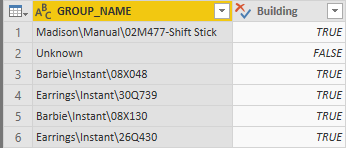


correct_output.PNG


But how do I print out the matching string itself, i.e. 02M477, 08X048, etc


I tried


# 'dataset' holds the input data for this script


pattern <- "[[:digit:]]{2}[[:alpha:]]{1}[[:digit:]]{3}"


isValid <- function(x) {grep(pattern , as.character(x), ignore.case=TRUE, value=TRUE)}


output <- within(dataset,{Building=isValid(dataset$GROUP_NAME)})


And I expect
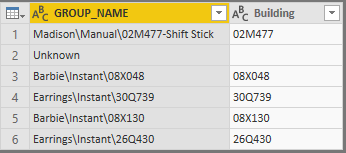
 

expected_output.PNG


Yet I get following error ... how to fix?


DataSource.Error: ADO.NET: R script error.
Error in `[<-.data.frame`(`*tmp*`, nl, value = list(Building = c("Madison\\Manual\\02M477-Shift Stick", :
replacement element 1 has 760 rows, need 768
Calls: within -> within.data.frame -> [<- -> [<-.data.frame
Execution halted

Details:
DataSourceKind=R
DataSourcePath=R
Message=R script error.
Error in `[<-.data.frame`(`*tmp*`, nl, value = list(Building = c("Madison\\Manual\\02M477-Shift Stick", :
replacement element 1 has 760 rows, need 768
Calls: within -> within.data.frame -> [<- -> [<-.data.frame
Execution halted

ErrorCode=-2147467259
ExceptionType=Microsoft.PowerBI.Scripting.R.Exceptions.RScriptRuntimeException

2 REPLIES 2
v-danhe-msft
Microsoft Employee
Microsoft Employee

Hi @ArtieLadie ,

Could you please tell me if your problem has been solved? If it is, could you please mark the helpful replies as Answered to close this topic?


Regards,

Daniel He


Community Support Team _ Daniel He
If this post helps, then please consider Accept it as the solution to help the other members find it more quickly.
v-danhe-msft
Microsoft Employee
Microsoft Employee

Hi @ArtieLadie ,

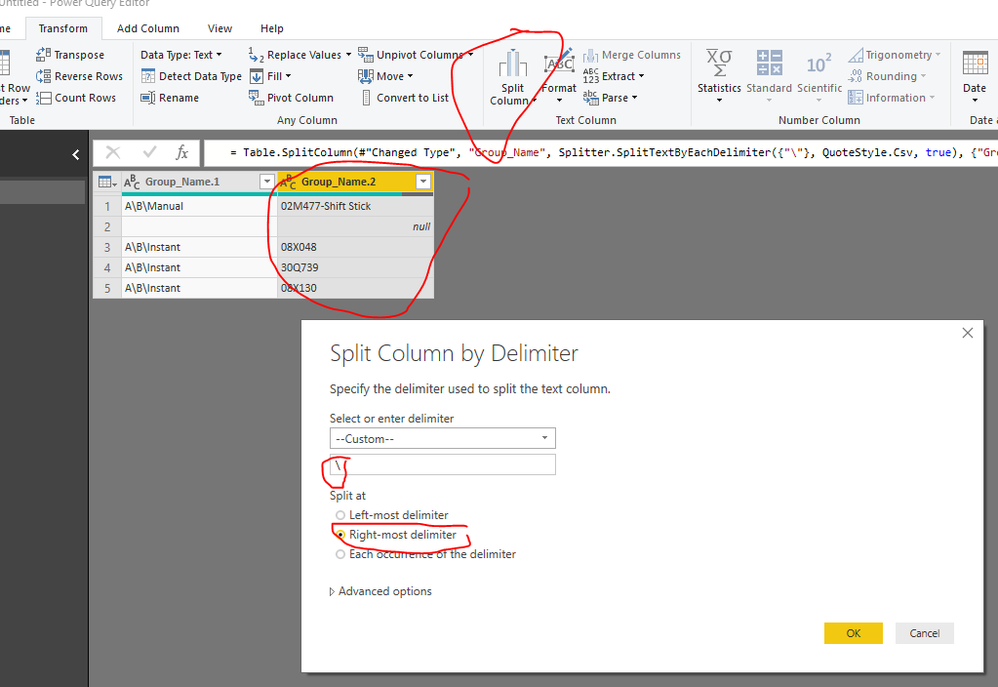
Based on my test, maybe you could refer to below workaround:

Use the split function:

1.PNG

And ues this function again(with character):

1.PNG

You could also download the pbix file to have a view.


Regards,

Daniel He


Community Support Team _ Daniel He
If this post helps, then please consider Accept it as the solution to help the other members find it more quickly.

Helpful resources

Announcements
Power BI DataViz World Championships carousel

Power BI DataViz World Championships - June 2026

A new Power BI DataViz World Championship is coming this June! Don't miss out on submitting your entry.

Join our Fabric User Panel

Join our Fabric User Panel

Share feedback directly with Fabric product managers, participate in targeted research studies and influence the Fabric roadmap.

March Power BI Update Carousel

Power BI Community Update - March 2026

Check out the March 2026 Power BI update to learn about new features.