I am following this tutorial to incorporate R into Microsoft PowerBI, http://radacad.com/power-bi-and-regular-expressions
Using my own data
I understand how
# 'dataset' holds the input data for this script
pattern <- "[[:digit:]]{2}[[:alpha:]]{1}[[:digit:]]{3}"
isValid <- function(x) {grepl(pattern , as.character(x), ignore.case=TRUE)}
output <- within(dataset,{Building=isValid(dataset$GROUP_NAME)})
Translates to
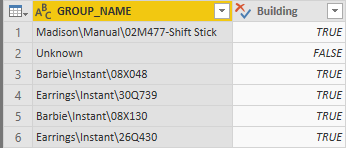
But how do I print out the matching string itself, i.e. 02M477, 08X048, etc
I tried
# 'dataset' holds the input data for this script
pattern <- "[[:digit:]]{2}[[:alpha:]]{1}[[:digit:]]{3}"
isValid <- function(x) {grep(pattern , as.character(x), ignore.case=TRUE, value=TRUE)}
output <- within(dataset,{Building=isValid(dataset$GROUP_NAME)})
And I expect
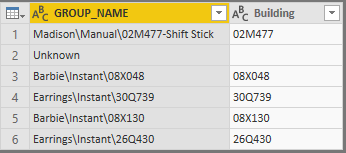
Yet I get following error ... how to fix?
DataSource.Error: ADO.NET: R script error.
Error in `[<-.data.frame`(`*tmp*`, nl, value = list(Building = c("Madison\\Manual\\02M477-Shift Stick", :
replacement element 1 has 760 rows, need 768
Calls: within -> within.data.frame -> [<- -> [<-.data.frame
Execution halted
Details:
DataSourceKind=R
DataSourcePath=R
Message=R script error.
Error in `[<-.data.frame`(`*tmp*`, nl, value = list(Building = c("Madison\\Manual\\02M477-Shift Stick", :
replacement element 1 has 760 rows, need 768
Calls: within -> within.data.frame -> [<- -> [<-.data.frame
Execution halted
ErrorCode=-2147467259
ExceptionType=Microsoft.PowerBI.Scripting.R.Exceptions.RScriptRuntimeException